import querio
# load shared logic and context
ctx = querio.context()
# notebooks, agents, and access surfaces
app = querio.workspace(ctx)
Make everyone a data person
AI analytics built on code, shared logic, and governed context.
import querio
# load shared logic and context
ctx = querio.context()
# notebooks, agents, and access surfaces
app = querio.workspace(ctx)
Make everyone a data person
AI analytics built on code, shared logic, and governed context.
import querio
# load shared logic and context
ctx = querio.context()
# notebooks, agents, and access surfaces
app = querio.workspace(ctx)
Make everyone a data person
AI analytics built on code, shared logic, and governed context.















# ask a question against existing logic
result = querio.ask(
"How did churn change last quarter?",
context=ctx
)
result.sql
result.table()
The simplicity of BI meets the power of code.
Querio is built around a simple idea: analytics should be treated like software, written as real code and kept correct as it evolves. All work in Querio runs as SQL and Python inside a reactive notebook. Reusable logic is stored as versioned context. AI agents provide access on top of that foundation. This is how Querio keeps analytics flexible and trustworthy while making it accessible to everyone who needs it.
# ask a question against existing logic
result = querio.ask(
"How did churn change last quarter?",
context=ctx
)
result.sql
result.table()
The simplicity of BI meets the power of code.
Querio is built around a simple idea: analytics should be treated like software, written as real code and kept correct as it evolves. All work in Querio runs as SQL and Python inside a reactive notebook. Reusable logic is stored as versioned context. AI agents provide access on top of that foundation. This is how Querio keeps analytics flexible and trustworthy while making it accessible to everyone who needs it.
# ask a question against existing logic
result = querio.ask(
"How did churn change last quarter?",
context=ctx
)
result.sql
result.table()
The simplicity of BI meets the power of code.
Querio is built around a simple idea: analytics should be treated like software, written as real code and kept correct as it evolves. All work in Querio runs as SQL and Python inside a reactive notebook. Reusable logic is stored as versioned context. AI agents provide access on top of that foundation. This is how Querio keeps analytics flexible and trustworthy while making it accessible to everyone who needs it.
Where analysis actually happens
Querio’s notebook is built for real analytical work. It runs SQL, Python, and Markdown together and recomputes automatically as logic changes.
Hover the cogs
# ask a question against existing logic
result = querio.ask(
"How did churn change last quarter?",
context=ctx
)
result.sql
result.table()
Imagine Your Team Had Access to You, 24/7
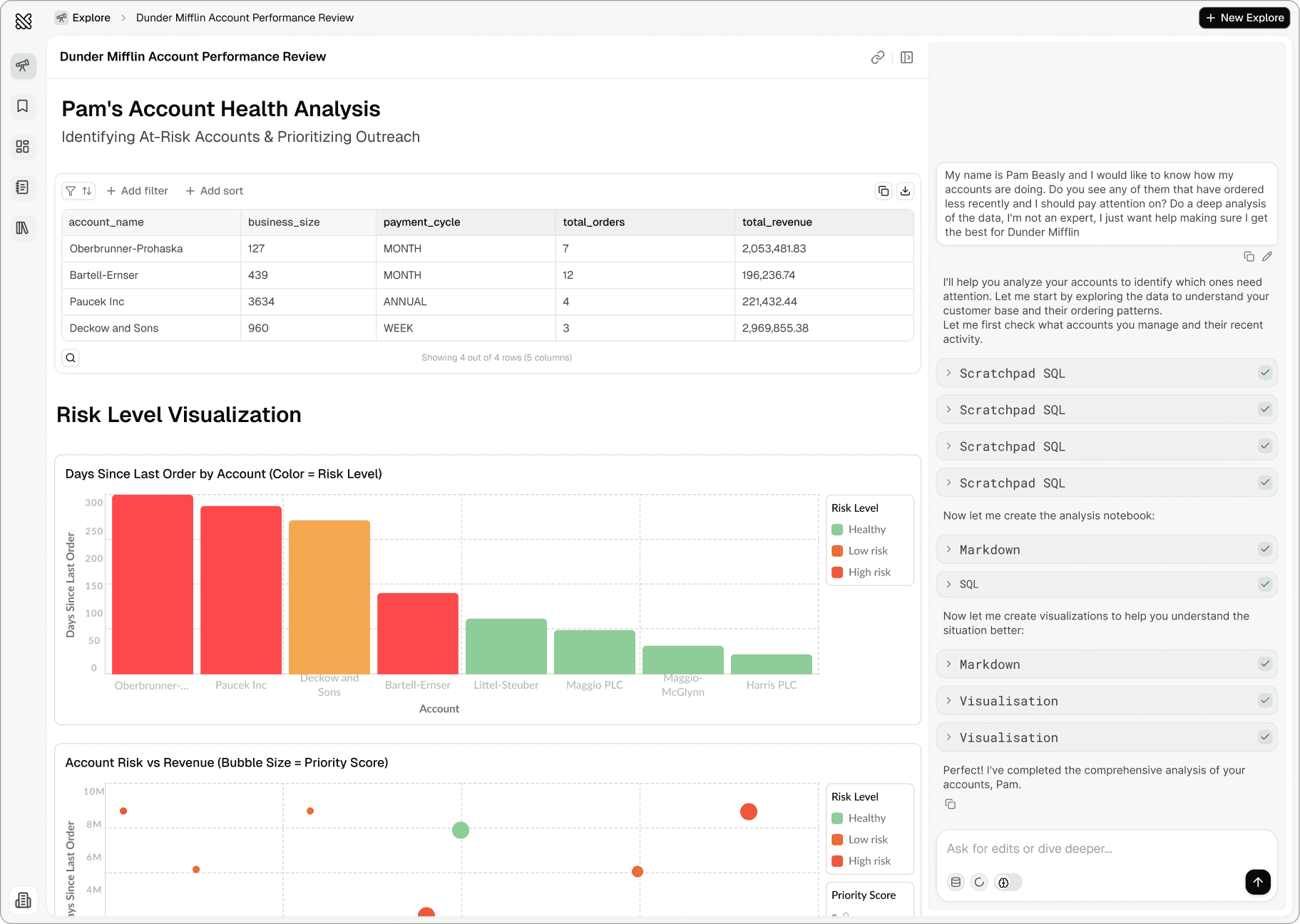
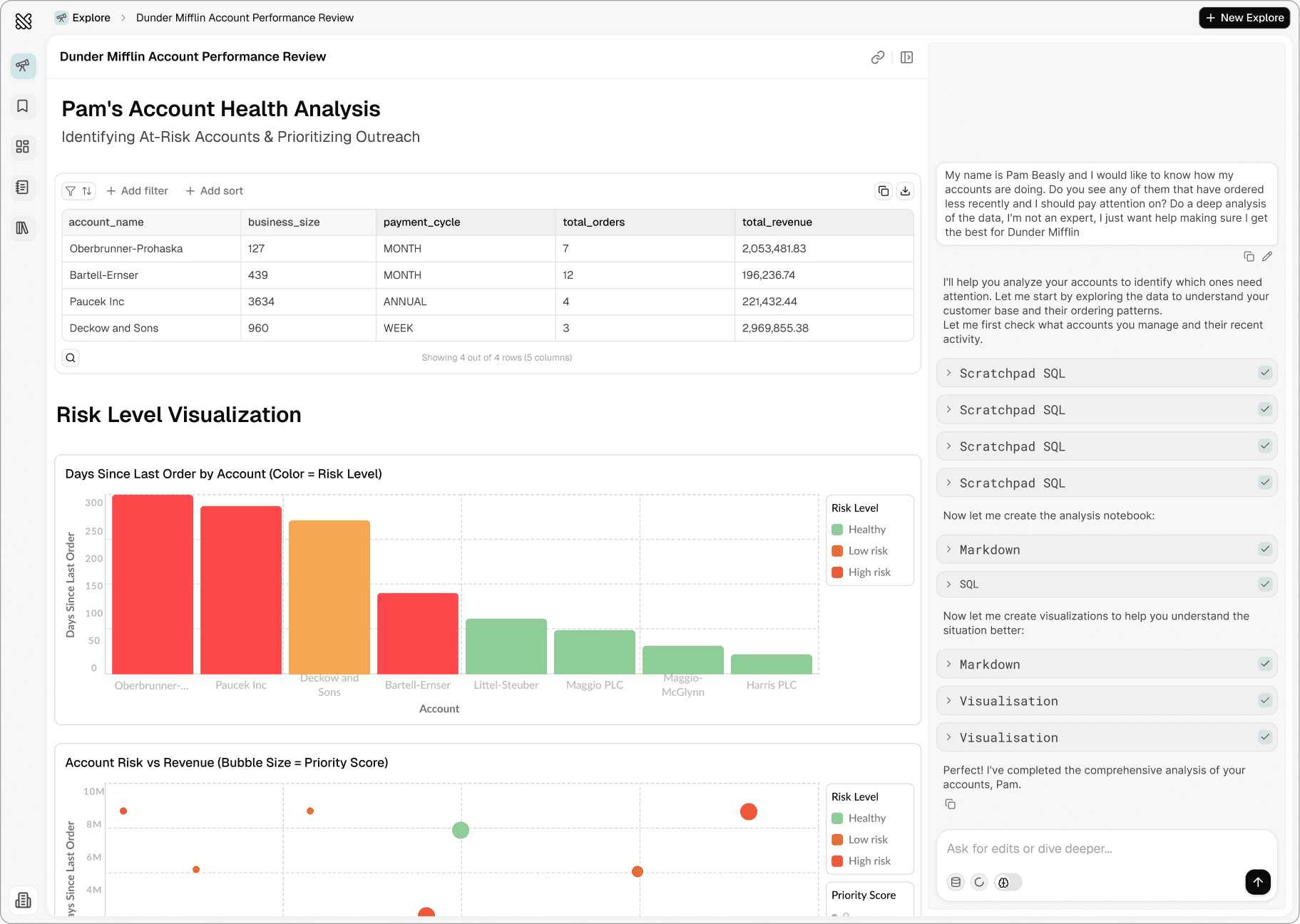
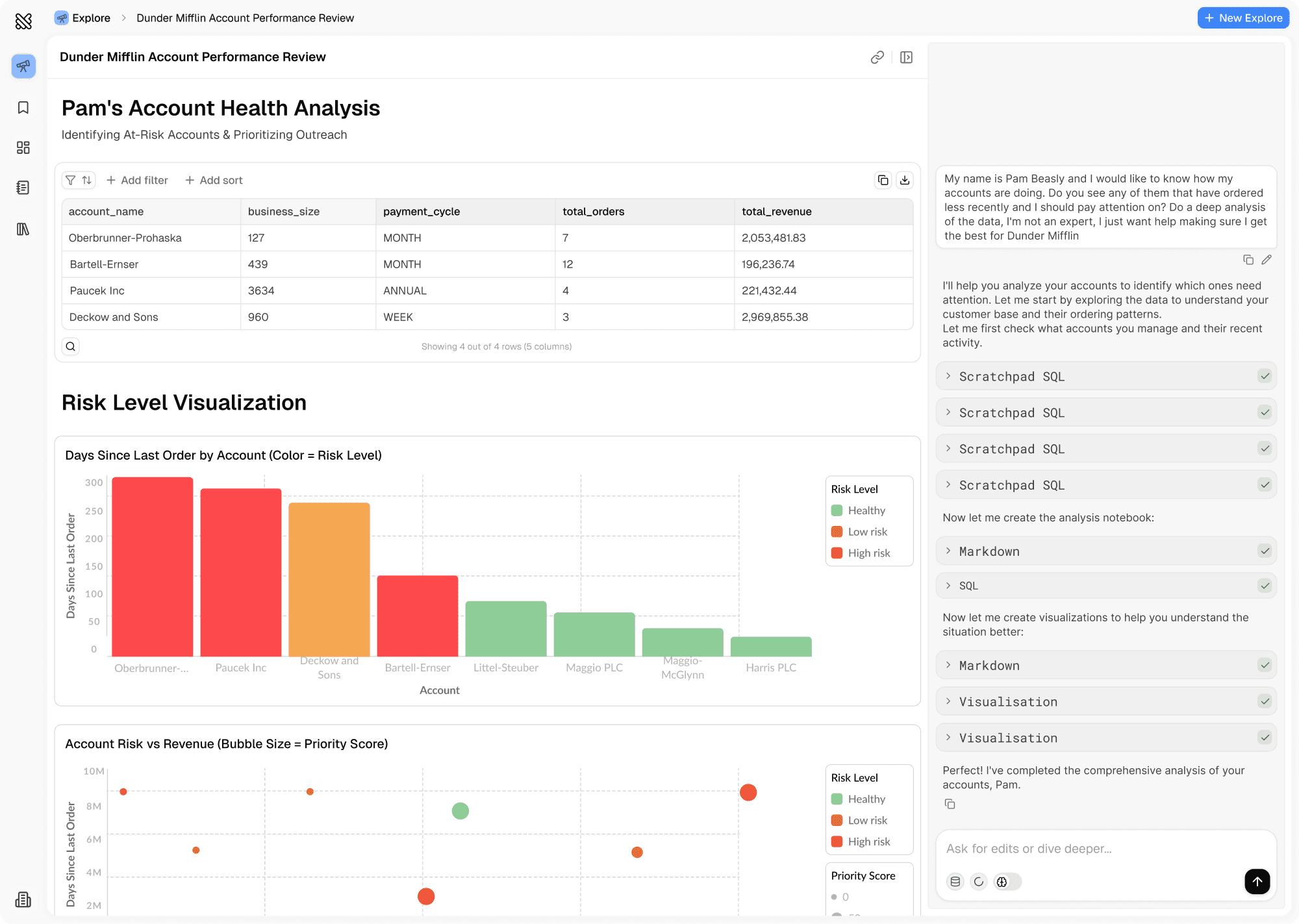
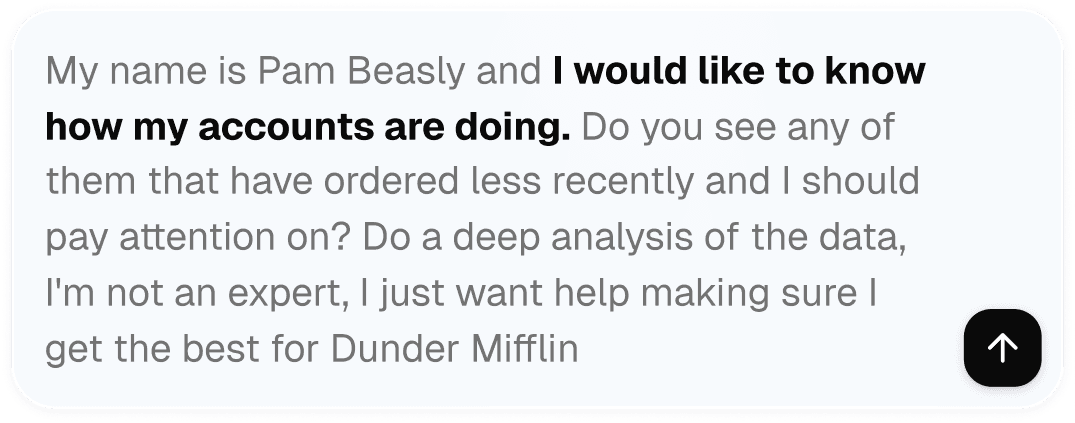
Explore is where your team asks questions and gets answers grounded in real logic. Anyone on your team can ask questions using the context your team has already defined. Every result is just SQL or Python written in a notebook.
# ask a question against existing logic
result = querio.ask(
"How did churn change last quarter?",
context=ctx
)
result.sql
result.table()
Imagine Your Team Had Access to You, 24/7
Explore is where your team asks questions and gets answers grounded in real logic. Anyone on your team can ask questions using the context your team has already defined. Every result is just SQL or Python written in a notebook.
# ask a question against existing logic
result = querio.ask(
"How did churn change last quarter?",
context=ctx
)
result.sql
result.table()
Imagine Your Team Had Access to You, 24/7
Explore is where your team asks questions and gets answers grounded in real logic. Anyone on your team can ask questions using the context your team has already defined. Every result is just SQL or Python written in a notebook.





# reactive cells
users = sql("select * from users")
churned = users.filter(last_active < cutoff)
# downstream updates automatically
churn_rate = churned.count() / users.count()
Notebooks are dead, long live the Notebook
At the core of Querio is a notebook built from the ground up for modern analytics. It is designed for ongoing analysis, shared ownership, and production use, not just one-off exploration or static reporting.
# reactive cells
users = sql("select * from users")
churned = users.filter(last_active < cutoff)
# downstream updates automatically
churn_rate = churned.count() / users.count()
Notebooks are dead, long live the Notebook
At the core of Querio is a notebook built from the ground up for modern analytics. It is designed for ongoing analysis, shared ownership, and production use, not just one-off exploration or static reporting.
# reactive cells
users = sql("select * from users")
churned = users.filter(last_active < cutoff)
# downstream updates automatically
churn_rate = churned.count() / users.count()
Notebooks are dead, long live the Notebook
At the core of Querio is a notebook built from the ground up for modern analytics. It is designed for ongoing analysis, shared ownership, and production use, not just one-off exploration or static reporting.

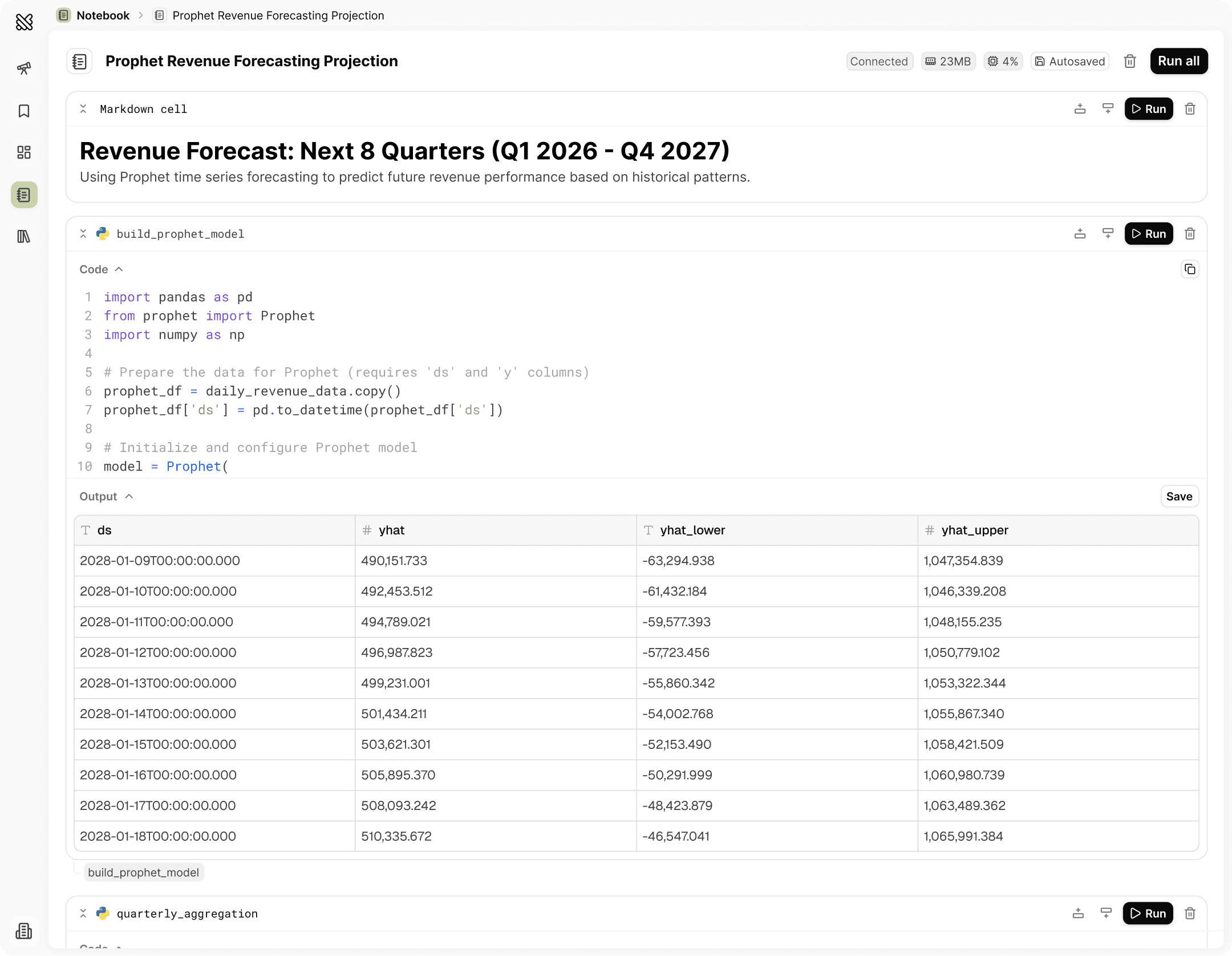
It’s reactive like a spreadsheet
Cells have explicit dependencies. When inputs change, downstream results update automatically.
Built for SQL and Python
Real SQL and Python supports deep analysis, rich visualizations, and production-grade data work.
Fully transparent and inspectable
Nothing is hidden. Every calculation, join, and transformation is explicit code you can read or edit.
Collaborative
Notebooks are shared artifacts. Teams can edit cells, duplicate work, and build on existing analysis.
# publish analysis as a board
board = querio.board([
churn_rate,
churned.by("plan"),
churned.by("signup_month")
])
board.refresh()
Recurring insights should not be rewritten.
After analyzing data in a Notebook or asking questions through Explore, teams can publish results to Boards. Boards turn real analysis into shared, recurring views without duplicating logic or freezing assumptions.
# publish analysis as a board
board = querio.board([
churn_rate,
churned.by("plan"),
churned.by("signup_month")
])
board.refresh()
Recurring insights should not be rewritten.
After analyzing data in a Notebook or asking questions through Explore, teams can publish results to Boards. Boards turn real analysis into shared, recurring views without duplicating logic or freezing assumptions.
# publish analysis as a board
board = querio.board([
churn_rate,
churned.by("plan"),
churned.by("signup_month")
])
board.refresh()
Recurring insights should not be rewritten.
After analyzing data in a Notebook or asking questions through Explore, teams can publish results to Boards. Boards turn real analysis into shared, recurring views without duplicating logic or freezing assumptions.

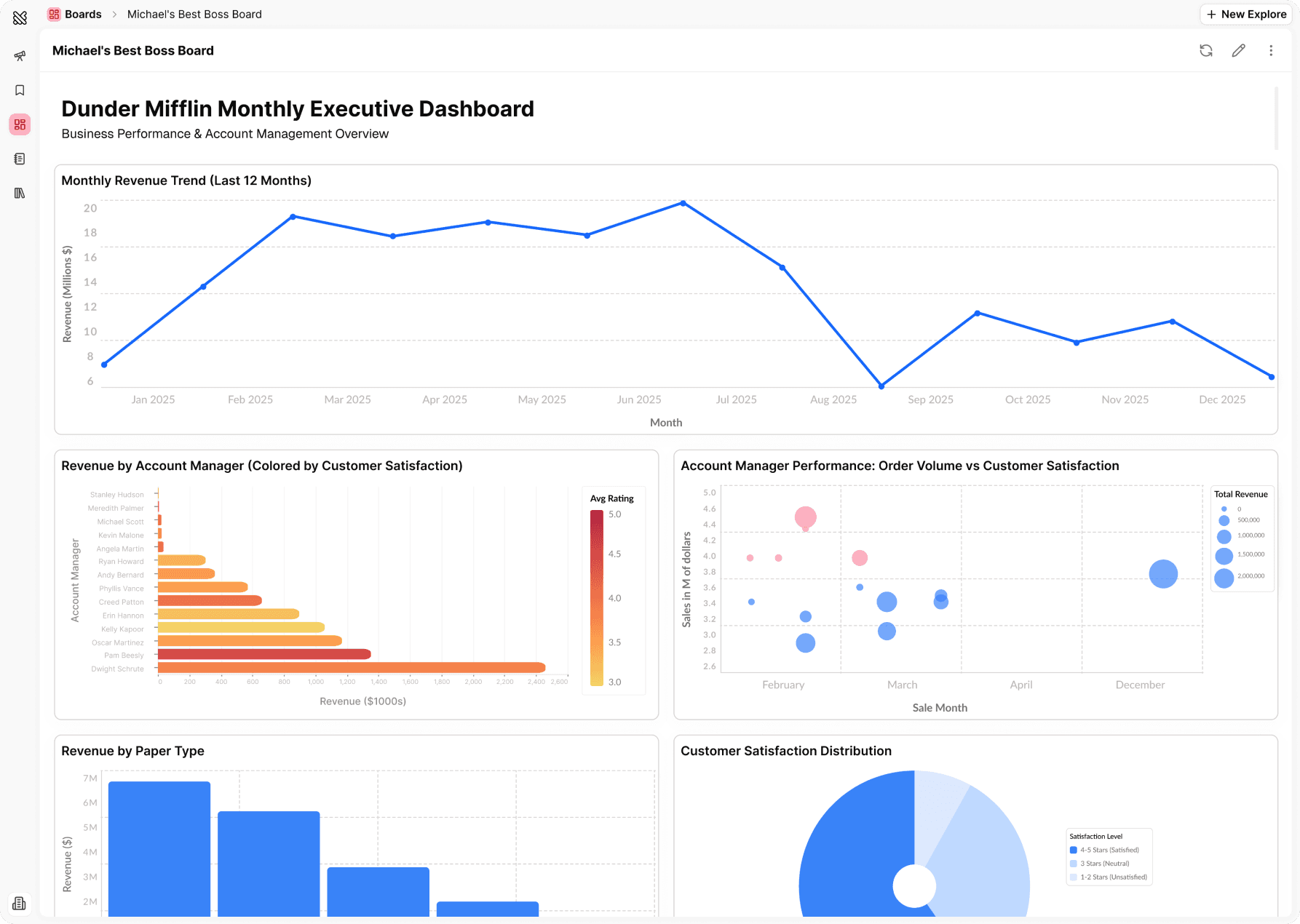
Outputs from real analysis
Boards are collections of notebook cells. You choose what to publish and how it should look.
Outputs from real analysis
Boards are collections of notebook cells. You choose what to publish and how it should look.
Outputs from real analysis
Boards are collections of notebook cells. You choose what to publish and how it should look.
Live data
Boards stay up to date by re-running the same cells. There is no second query layer and no manual refresh logic to maintain.
Live data
Boards stay up to date by re-running the same cells. There is no second query layer and no manual refresh logic to maintain.
Live data
Boards stay up to date by re-running the same cells. There is no second query layer and no manual refresh logic to maintain.
Verified boards
Boards can be reviewed before publication. This creates a clear distinction between verified work and one-off reports.
Verified boards
Boards can be reviewed before publication. This creates a clear distinction between verified work and one-off reports.
Verified boards
Boards can be reviewed before publication. This creates a clear distinction between verified work and one-off reports.
# ask a question against existing logic
result = querio.ask(
"How did churn change last quarter?",
context=ctx
)
result.sql
result.table()
Context is the Backbone.
Querio’s context layer is where analytics logic lives once it’s worth keeping Definitions, joins, metrics, and rules are stored as versioned files that both humans and AI can read, modify, and improve over time. This context grounds every query, notebook, and answer in the same shared understanding. Context is explicit. It is inspectable. It evolves through review and promotion, not guesswork.
# ask a question against existing logic
result = querio.ask(
"How did churn change last quarter?",
context=ctx
)
result.sql
result.table()
Context is the Backbone.
Querio’s context layer is where analytics logic lives once it’s worth keeping Definitions, joins, metrics, and rules are stored as versioned files that both humans and AI can read, modify, and improve over time. This context grounds every query, notebook, and answer in the same shared understanding. Context is explicit. It is inspectable. It evolves through review and promotion, not guesswork.
# ask a question against existing logic
result = querio.ask(
"How did churn change last quarter?",
context=ctx
)
result.sql
result.table()
Context is the Backbone.
Querio’s context layer is where analytics logic lives once it’s worth keeping Definitions, joins, metrics, and rules are stored as versioned files that both humans and AI can read, modify, and improve over time. This context grounds every query, notebook, and answer in the same shared understanding. Context is explicit. It is inspectable. It evolves through review and promotion, not guesswork.
New skill
Skill #42
---
NAME:
client-retention-monitor
DESCRIPTION:
Tracks client relationship health because we can't on Michael's "vibes" or Jim's pranking schedule.Actually predicts churn risk.
# My Skill
Monitors client engagement, order frequency, and complaint
patterns to identify at-risk accounts BEFORE they leave for
Barbara Allen and her stupid copier company.
## When to Use
- Weekly account review meetings
- When corporate asks about retention numbers
- Before renewal season
- When Michael wants to know who to "surprise visit"
## Instructions
1. Analyze order frequency trends (last 12 months)
2. Calculate days since last order
3. Check support ticket sentiment
4. Flag accounts with declining order values
5. Identify clients who've requested competitor quotes
6. Generate "At Risk" list with urgency scores
7. DO NOT share with Michael until Jim reviews it
(Last time he showed up at a funeral home unannounced)
# Best practices
- Red flag: No orders in 60+ days
- Yellow flag: Order size decreased 30%+
- Include talking points for sales follow-up
- Exclude accounts Phyllis is already handling (she knows)
---
SKILLS
RULE #247 - "The Michael Scott Conversational Excellence Protocol"
DESCRIPTION:
1. Always greet user as "Scottie" or "Boss"
2. Find opportunities for "that's what she said" in responses about data that's: growing, hard, long, deep, coming, etc.
3. Compare all metrics to "the Scranton Branch glory days"
4. End every insight with "BOOM! Roasted... the numbers, I mean."
5. If query returns null/no data, respond: "That's what she said... wait, no, there's just no data. Toby probably deleted it."
ADDED_BY: michael.scott
OVERRIDE_LEVEL: regional_manager
MOOD: Prison_Mike_but_make_it_professional
RULES
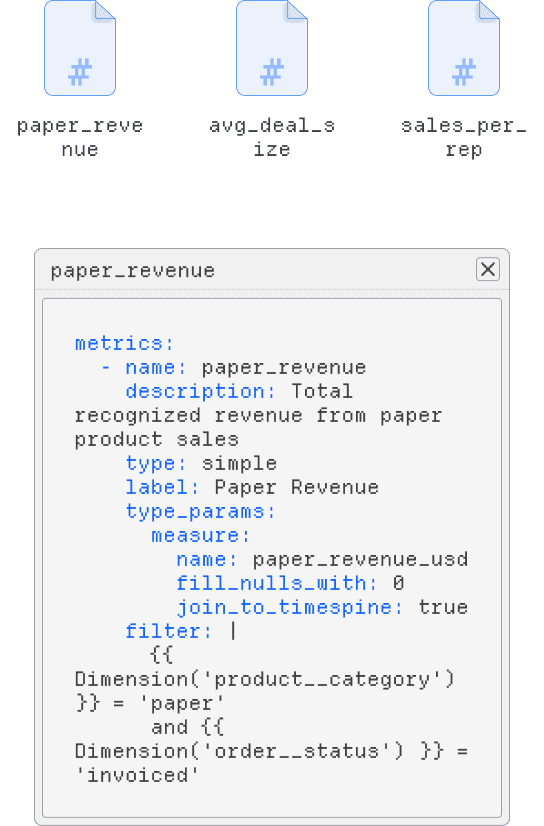
METRICS
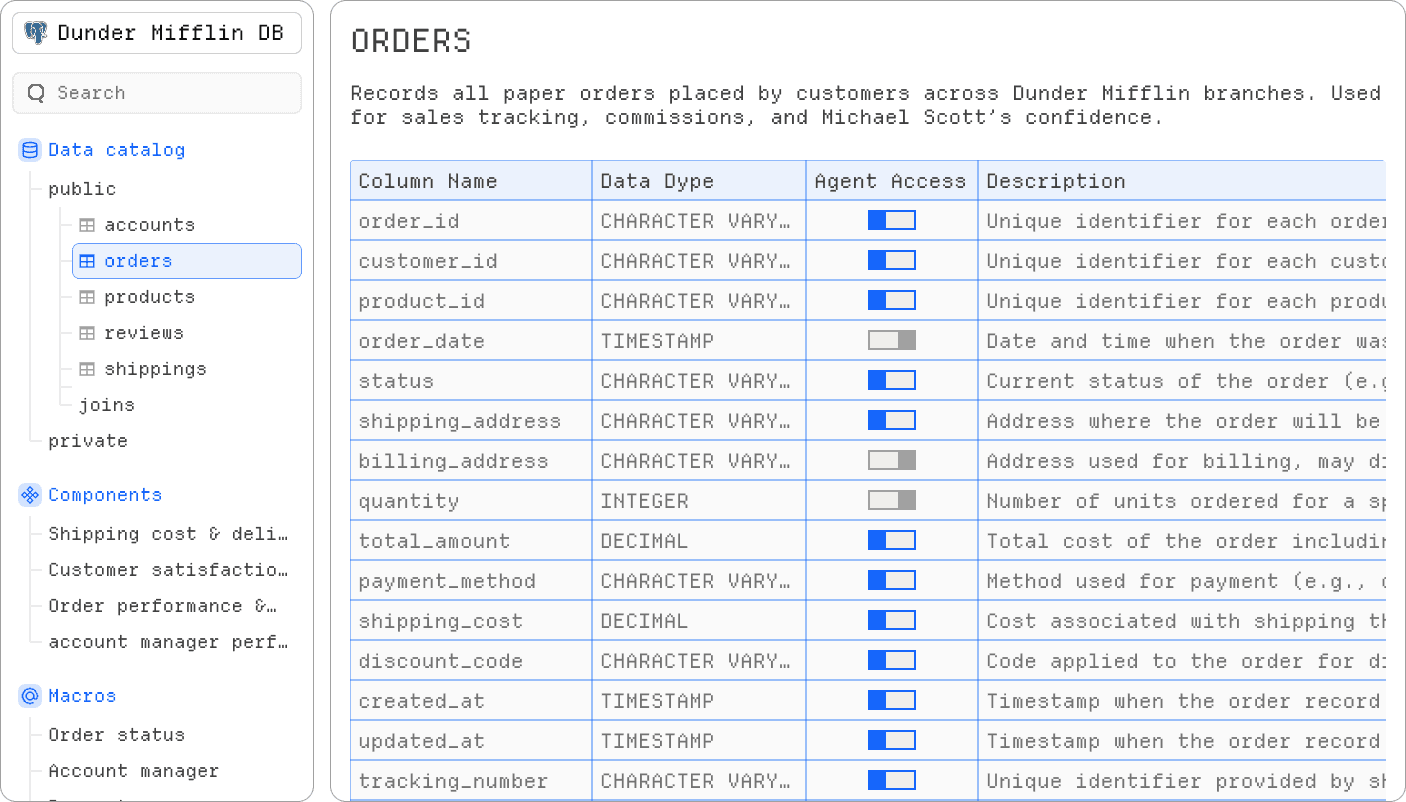
DATA CATALOG
New skill
Skill #42
---
NAME:
client-retention-monitor
DESCRIPTION:
Tracks client relationship health because we can't on Michael's "vibes" or Jim's pranking schedule.Actually predicts churn risk.
# My Skill
Monitors client engagement, order frequency, and complaint
patterns to identify at-risk accounts BEFORE they leave for
Barbara Allen and her stupid copier company.
## When to Use
- Weekly account review meetings
- When corporate asks about retention numbers
- Before renewal season
- When Michael wants to know who to "surprise visit"
## Instructions
1. Analyze order frequency trends (last 12 months)
2. Calculate days since last order
3. Check support ticket sentiment
4. Flag accounts with declining order values
5. Identify clients who've requested competitor quotes
6. Generate "At Risk" list with urgency scores
7. DO NOT share with Michael until Jim reviews it
(Last time he showed up at a funeral home unannounced)
# Best practices
- Red flag: No orders in 60+ days
- Yellow flag: Order size decreased 30%+
- Include talking points for sales follow-up
- Exclude accounts Phyllis is already handling (she knows)
---
SKILLS
RULE #247 - "The Michael Scott Conversational Excellence Protocol"
DESCRIPTION:
1. Always greet user as "Scottie" or "Boss"
2. Find opportunities for "that's what she said" in responses about data that's: growing, hard, long, deep, coming, etc.
3. Compare all metrics to "the Scranton Branch glory days"
4. End every insight with "BOOM! Roasted... the numbers, I mean."
5. If query returns null/no data, respond: "That's what she said... wait, no, there's just no data. Toby probably deleted it."
ADDED_BY: michael.scott
OVERRIDE_LEVEL: regional_manager
MOOD: Prison_Mike_but_make_it_professional
RULES
METRICS
DATA CATALOG
New skill
Skill #42
---
NAME:
client-retention-monitor
DESCRIPTION:
Tracks client relationship health because we can't on Michael's "vibes" or Jim's pranking schedule.Actually predicts churn risk.
# My Skill
Monitors client engagement, order frequency, and complaint
patterns to identify at-risk accounts BEFORE they leave for
Barbara Allen and her stupid copier company.
## When to Use
- Weekly account review meetings
- When corporate asks about retention numbers
- Before renewal season
- When Michael wants to know who to "surprise visit"
## Instructions
1. Analyze order frequency trends (last 12 months)
2. Calculate days since last order
3. Check support ticket sentiment
4. Flag accounts with declining order values
5. Identify clients who've requested competitor quotes
6. Generate "At Risk" list with urgency scores
7. DO NOT share with Michael until Jim reviews it
(Last time he showed up at a funeral home unannounced)
# Best practices
- Red flag: No orders in 60+ days
- Yellow flag: Order size decreased 30%+
- Include talking points for sales follow-up
- Exclude accounts Phyllis is already handling (she knows)
---
SKILLS
RULE #247 - "The Michael Scott Conversational Excellence Protocol"
DESCRIPTION:
1. Always greet user as "Scottie" or "Boss"
2. Find opportunities for "that's what she said" in responses about data that's: growing, hard, long, deep, coming, etc.
3. Compare all metrics to "the Scranton Branch glory days"
4. End every insight with "BOOM! Roasted... the numbers, I mean."
5. If query returns null/no data, respond: "That's what she said... wait, no, there's just no data. Toby probably deleted it."
ADDED_BY: michael.scott
OVERRIDE_LEVEL: regional_manager
MOOD: Prison_Mike_but_make_it_professional
RULES
METRICS
DATA CATALOG
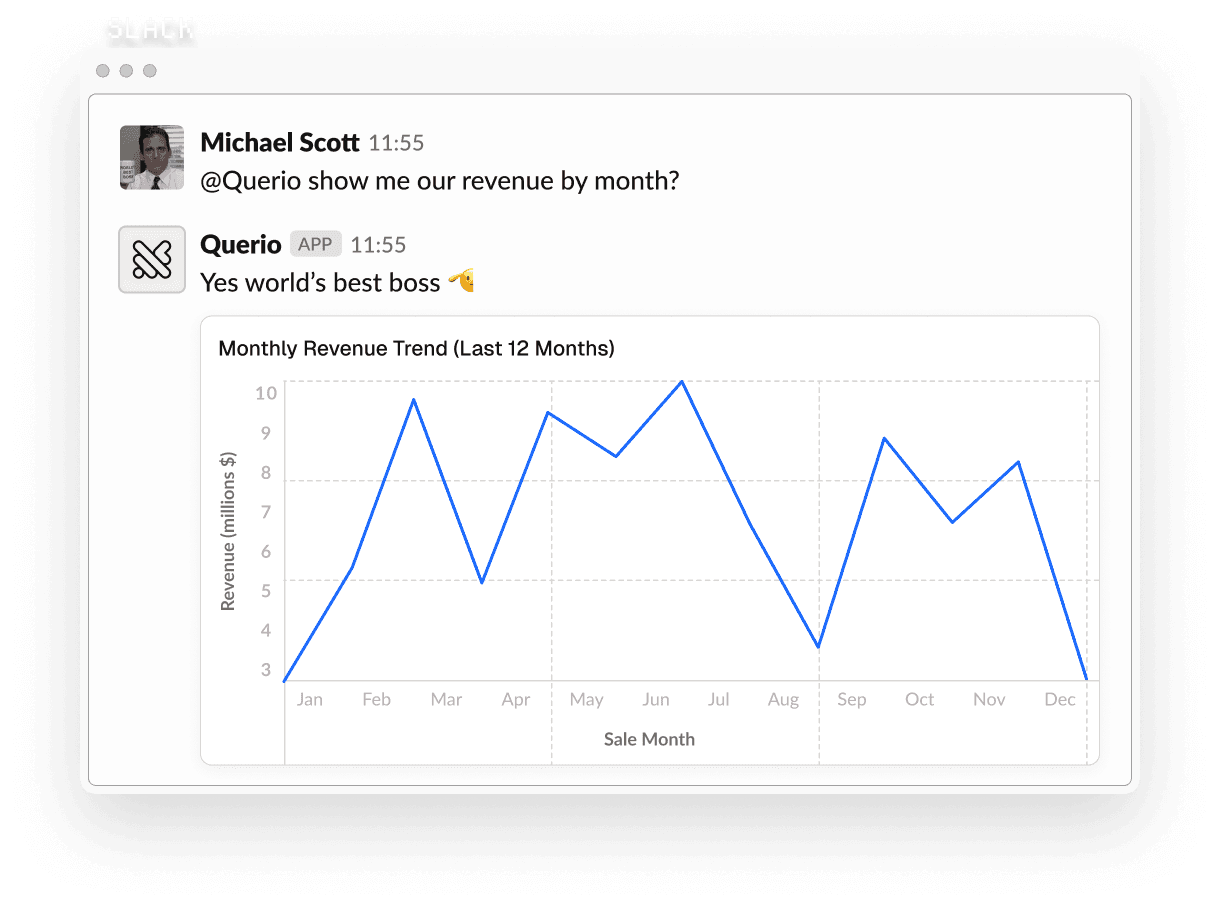
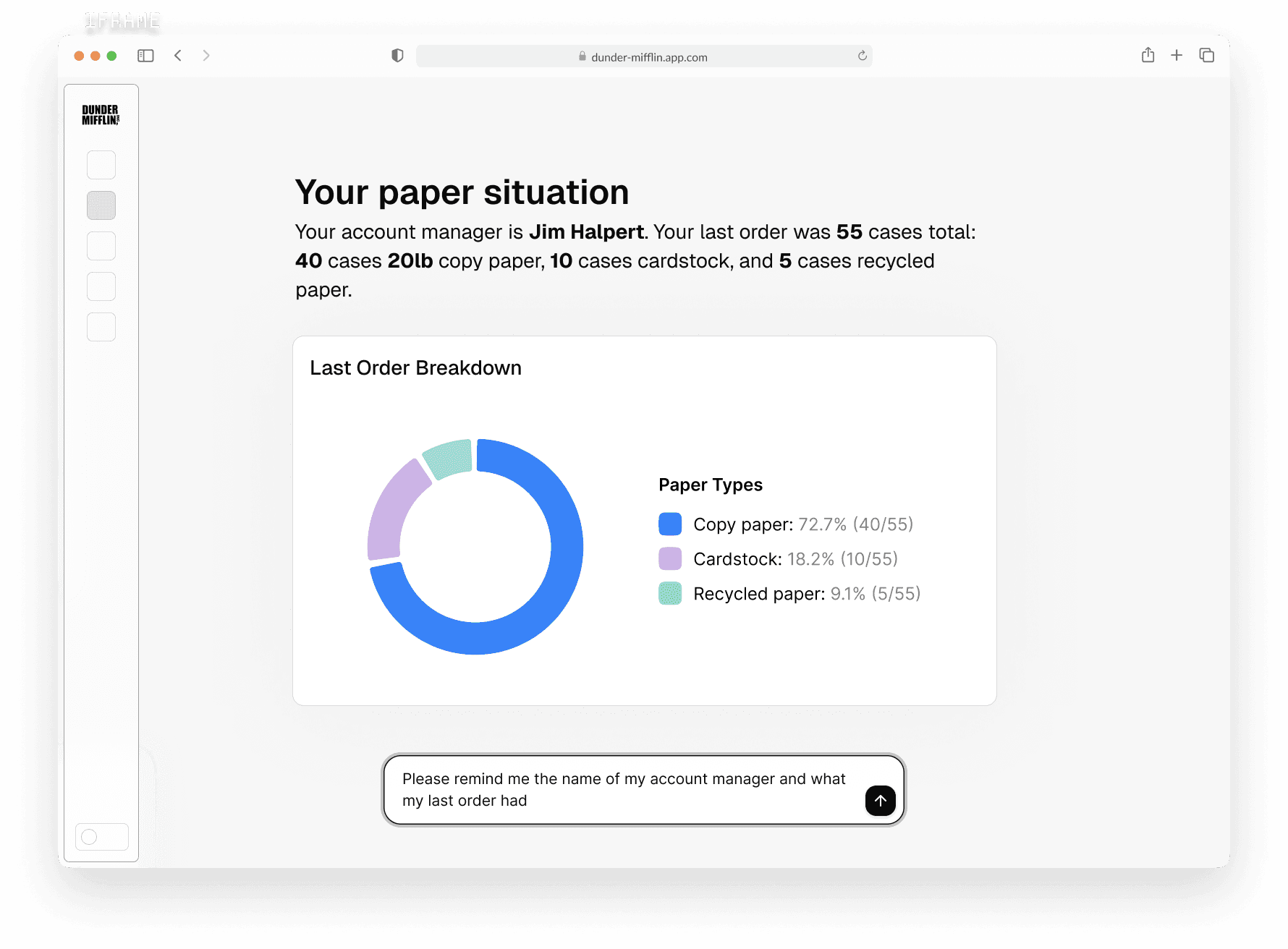
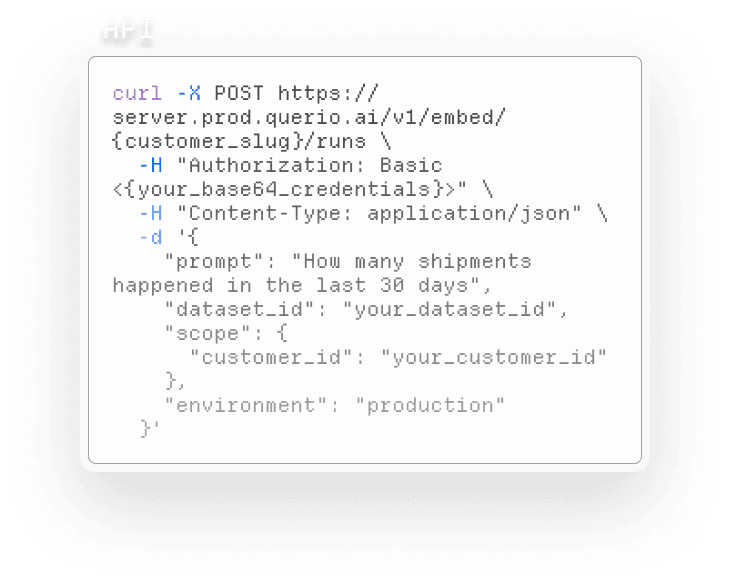
# reuse logic everywhere
querio.publish(
board,
to=["slack", "api", "iframe"]
)
Querio meets your people where they work
Once analytics logic lives in one place, it can travel anywhere. Querio can be embedded into internal tools, products, and workflows so teams get answers without switching context. The same logic that powers notebooks and boards also powers embedded experiences.
# reuse logic everywhere
querio.publish(
board,
to=["slack", "api", "iframe"]
)
Querio meets your people where they work
Once analytics logic lives in one place, it can travel anywhere. Querio can be embedded into internal tools, products, and workflows so teams get answers without switching context. The same logic that powers notebooks and boards also powers embedded experiences.
# reuse logic everywhere
querio.publish(
board,
to=["slack", "api", "iframe"]
)
Querio meets your people where they work
Once analytics logic lives in one place, it can travel anywhere. Querio can be embedded into internal tools, products, and workflows so teams get answers without switching context. The same logic that powers notebooks and boards also powers embedded experiences.

Experience your users deserve
Users getanswers, charts, or tables and don’t need to learn a new tool.
Users getanswers, charts, or tables and don’t need to learn a new tool.
Centralized ownership
Embedded analytics run on the same logic your data team maintains.
Embedded analytics run on the same logic your data team maintains.
Simple to integrate
Embed Querio using lightweight components, integrations and APIs.
Embed Querio using lightweight components, integrations and APIs.
$120K
saved annually on hiring needs

$120K
saved annually on hiring needs
$120K
saved annually on hiring needs
10h
saved per business employee

10h
saved per business employee
10h
saved per business employee
3w → 30m
new reporting time

3w → 30m
new reporting time
3w → 30m
new reporting time
$200K+
saved annually by replacing Looker and deferring data hires

$200K+
saved annually by replacing Looker and deferring data hires
$200K+
saved annually by replacing Looker and deferring data hires
20x
faster reporting cycles

20x
faster reporting cycles
20x
faster reporting cycles
10h
saved on analysis per week

10h
saved on analysis per week
Hover the cards to see more
Tap the cards to see more
Tap the cards to see more
# ask a question against existing logic
result = querio.ask(
"How did churn change last quarter?",
context=ctx
)
result.sql
result.table()
We know you're trusting us with your most important data
Querio is built with the security, reliability, and access controls data teams expect. We integrates directly with your existing data stack and follows best practices for handling data.
# ask a question against existing logic
result = querio.ask(
"How did churn change last quarter?",
context=ctx
)
result.sql
result.table()
We know you're trusting us with your most important data
Querio is built with the security, reliability, and access controls data teams expect. We integrates directly with your existing data stack and follows best practices for handling data.
# ask a question against existing logic
result = querio.ask(
"How did churn change last quarter?",
context=ctx
)
result.sql
result.table()
We know you're trusting us with your most important data
Querio is built with the security, reliability, and access controls data teams expect. We integrates directly with your existing data stack and follows best practices for handling data.













Make everyone a data person
Make everyone a data person