Data Warehouse Modernization: A Roadmap for 2026
Your complete guide to data warehouse modernization. Learn modern architectures, migration strategies, and how to calculate ROI for mid-market data teams.
https://www.youtube.com/watch?v=ou9HXTCcIJA
published
Outrank AI
data warehouse modernization, cloud data warehouse, data migration strategy, data architecture, data analytics
77c97abf-3630-4f0b-b1da-4583ce3b84de

Most mid-market companies don't have a warehouse problem first. They have a workflow problem.
The pattern is familiar. Marketing wants campaign performance by segment. Product wants activation by cohort. Finance wants a board-ready revenue view that matches billing. Leadership wants one number for weekly growth. Every request lands on the data team, and the data team becomes a human API. Analysts spend their week rewriting SQL, reconciling definitions, and answering the same question in five slightly different ways.
At that point, people usually say they need a cloud migration. Sometimes they do. But a lot of teams already have a cloud warehouse and still can't keep up. The queue stays long. Metric disputes keep happening. Self-service tools get purchased, then abandoned because users don't trust the data or can't get answers without help.
That's why data warehouse modernization matters now. Not as an infrastructure refresh alone, but as an operating model change. The goal is to stop treating the warehouse like a faster backend for the same old request bottleneck. The goal is to build a system where the data team defines standards, owns quality, and enables the business to move without filing a ticket for every question.
I've seen the same mistake repeatedly. Teams modernize storage and compute, then keep the same ownership model, the same brittle transformations, and the same undefined metrics. They end up with a faster warehouse and a more expensive bottleneck.
The practical path is different. Keep what still works. Redesign what slows the business down. Put governance where people work. Measure whether the business needs fewer analyst handoffs, not just faster queries.
Table of Contents
Introduction When Your Data Team is the Bottleneck
A data team becomes a bottleneck gradually, then all at once.
It starts with good intentions. Centralize reporting. Clean up dashboards. Create one warehouse. Put a small team in charge so metrics stay consistent. That works for a while, especially when the company is small and most questions come from a handful of leaders.
Then growth changes the load. Product managers want event-level breakdowns. Sales wants territory views. Customer success wants churn signals. Finance wants reconciliation. Suddenly the same two analysts are serving half the company. They aren't doing low-value work because they're lazy or under-skilled. They're doing it because the operating model requires them to stand between raw data and every business decision.
That's the moment to rethink data warehouse modernization.
Modernization isn't just moving Teradata, SQL Server, Oracle, or an old Redshift setup into a newer platform. It's deciding whether the business will continue to depend on a central reporting queue, or whether the warehouse becomes shared infrastructure that others can use safely.
Practical rule: If every important question still needs analyst intervention, your stack isn't modernized yet, even if your warehouse is in the cloud.
For a first major modernization, mid-market companies usually don't need a grand redesign. They need a sharper definition of what the data team should own directly and what the business should be able to do without waiting. That means choosing architecture with restraint, migrating with discipline, and designing governance before self-service spreads confusion at scale.
Why Data Warehouse Modernization Is Now Essential
The pressure usually shows up before the platform fails.
A leadership team asks for weekly pricing analysis, product wants cohort behavior by feature, finance needs cleaner month-end reconciliation, and sales wants pipeline reporting that matches the board deck. The warehouse may still run. Queries may even finish fast enough. But if every new question waits on the same small data team, growth starts to outpace the operating model.
That is why modernization matters now. The issue is not only performance. It is decision latency.
A legacy warehouse slows more than reporting. It slows launch reviews, experiment analysis, planning cycles, and cross-functional trust in the numbers. Teams learn to lower their expectations because they assume data will arrive late, arrive incomplete, or require a long back-and-forth to interpret.
Agility is the constraint
A BARC survey on data warehouse modernization found that 44% of respondents identified a lack of agility in the data warehouse development process as the most pressing issue. That lines up with what mid-market teams run into in practice. Storage and compute are rarely the first limit. The harder problem is turning a business question into a trusted dataset, metric, or model without weeks of dependency and rework.
This is also where many modernization projects go off course. They treat the warehouse as an infrastructure problem only. The platform changes, but request flows, ownership, testing, and metric definitions stay the same. The company gets newer technology and the same queue.
For a growing company, speed changes behavior. If provisioning takes too long, teams avoid exploratory work. If data models are brittle, analysts spend their time patching instead of building. If access remains ticket-driven, self-service never gets past basic dashboards.
The underlying architecture still matters, and the main data warehouse architecture options shape what your team can support over the next few years. But architecture alone does not remove the bottleneck. The operating model has to change with it.
A company can move into Snowflake, BigQuery, Databricks, or Synapse and still keep the same failure modes:
Unclear metric ownership: Revenue, activation, and retention still mean different things across teams.
Manual transformation logic: Important business rules live in notebooks, BI tools, or one engineer's head.
Ticket-based access to insight: Analysts remain the handoff point for every non-trivial question.
Tool sprawl without standards: Ingestion, transformation, governance, and BI work, but not as one system.
I have seen teams cut infrastructure pain and still disappoint the business because none of these issues changed. Query performance improved. Delivery did not.
The inflection point comes earlier than many leaders expect. You do not need a total platform failure to justify modernization. You need enough business demand, enough metric conflict, and enough analyst dependency that the cost of waiting starts showing up in revenue planning, customer decisions, and execution speed. At that point, staying put is usually more expensive than changing how data is produced, governed, and used.
Choosing Your Modern Data Architecture
Architecture choices get overcomplicated because vendors describe them as ideologies. For a mid-market company, they're better understood as operating constraints.
The simple test is this. What kind of data work do you need to support in the next few years, and how much organizational complexity can your team absorb?
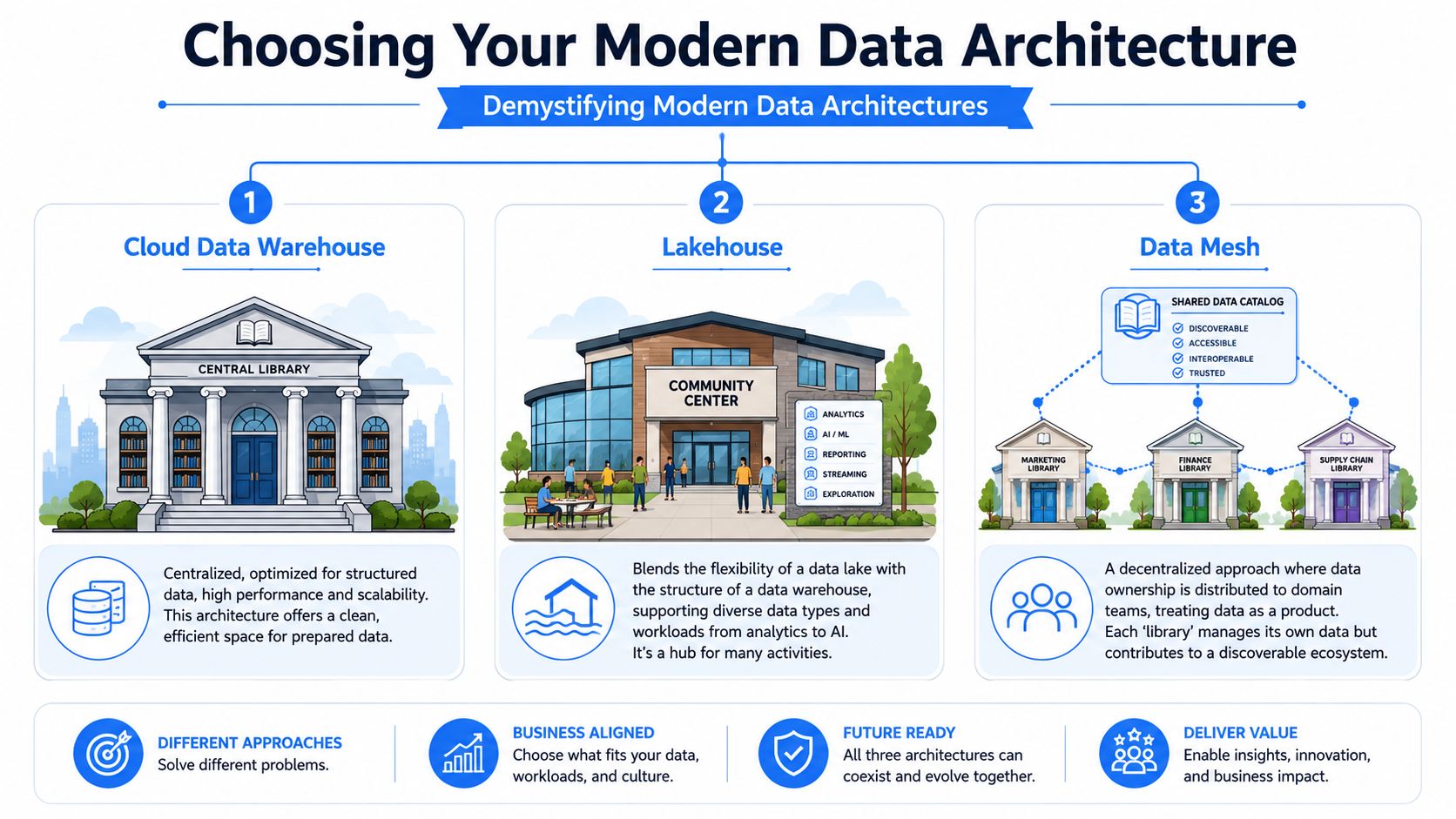
A useful default is the move from fragmented systems into a unified cloud architecture. Databricks' guidance on data modernization is directionally right here: reduce complexity, document the current state, define the future-state architecture, and use measurable success metrics. That's a practical lens for architecture decisions, especially if you're comparing old warehouse plus data lake plus BI sprawl against one more coherent stack.
If you want a broader taxonomy, this overview of data warehouse architectures is a helpful companion.
Cloud data warehouse
Think of a cloud data warehouse as a highly organized library. Everything valuable is cataloged, cleaned up, and arranged for fast retrieval.
This model fits most mid-market teams because it centralizes control. Structured data is the main priority. Reporting, finance, product analytics, and operational dashboards are usually the core workloads. Teams can enforce metric definitions more easily because the data is shaped before broad consumption.
The trade-off is flexibility. If your company expects heavy work across raw files, ML experimentation, large semi-structured data volumes, or mixed engineering and analytics workflows, a warehouse-only design can become too narrow. Teams then bolt on side systems, and fragmentation returns.
A cloud data warehouse is usually the right first choice when:
Your team is small: You need central governance more than architectural freedom.
Your main pain is inconsistent reporting: Standardized models matter more than raw storage flexibility.
Most consumers are business users: They need trusted tables and simple access patterns.
Lakehouse
A lakehouse is closer to a library with an attached workshop. It keeps a central knowledge base, but also gives teams room to process different formats and use cases in one environment.
This approach makes sense when your company has both BI needs and broader analytical workloads. You may want structured reporting, data science experimentation, semi-structured event analysis, and AI-oriented pipelines without maintaining completely separate systems. It can be a strong fit for companies using Databricks or similar platforms where engineering and analytics already overlap.
The trade-off is operational discipline. A lakehouse gives more freedom, which means teams need stronger conventions around modeling, governance, and discoverability. Without those, it turns into a large, confusing storage layer with uneven trust.
I usually recommend a lakehouse when the company already has meaningful complexity in product data, event streams, or ML-related workflows, but still wants one governed environment instead of disconnected tools.
Data mesh
A data mesh is a network of specialized libraries connected by a shared catalog. Each domain owns its own collection, but everyone works against common standards for discoverability and interoperability.
This is the most misunderstood option. Many companies adopt the language of data mesh long before they have the organizational maturity to support it. Domain ownership sounds attractive. In practice, it requires strong product management discipline, clear data contracts, shared governance standards, and domain teams capable of owning data products as part of their normal work.
For most mid-market companies, a full mesh is too early.
If your central team is already overwhelmed, distributing ownership to unprepared teams won't remove complexity. It just spreads inconsistency faster.
That doesn't mean mesh ideas are useless. They're valuable when applied selectively. Let business domains own source knowledge and metric context, while a central data team still owns platform standards, shared models, and governance guardrails.
A sensible progression often looks like this:
Start centralized: Build a trustworthy core warehouse or lakehouse.
Standardize ownership: Define who owns pipelines, semantic definitions, and access.
Decentralize carefully: Push selected ownership to mature domains only when they can maintain it.
For a first major modernization, most mid-market companies should choose either a cloud data warehouse or a lakehouse, then borrow only the parts of data mesh they can operationalize.
Selecting a Practical Migration Strategy
A migration usually fails long before cutover. It fails when the team treats every pipeline as equally important, every stakeholder request as urgent, and every legacy artifact as something that must survive.
The goal is not to copy your current warehouse into a newer home. The goal is to reduce risk, protect business continuity, and use the migration window to fix the operating problems that made the old environment hard to trust in the first place. For mid-market teams, that means choosing a strategy the team can run while still supporting the business.
Early in planning, it helps to see the main trade-offs visually.
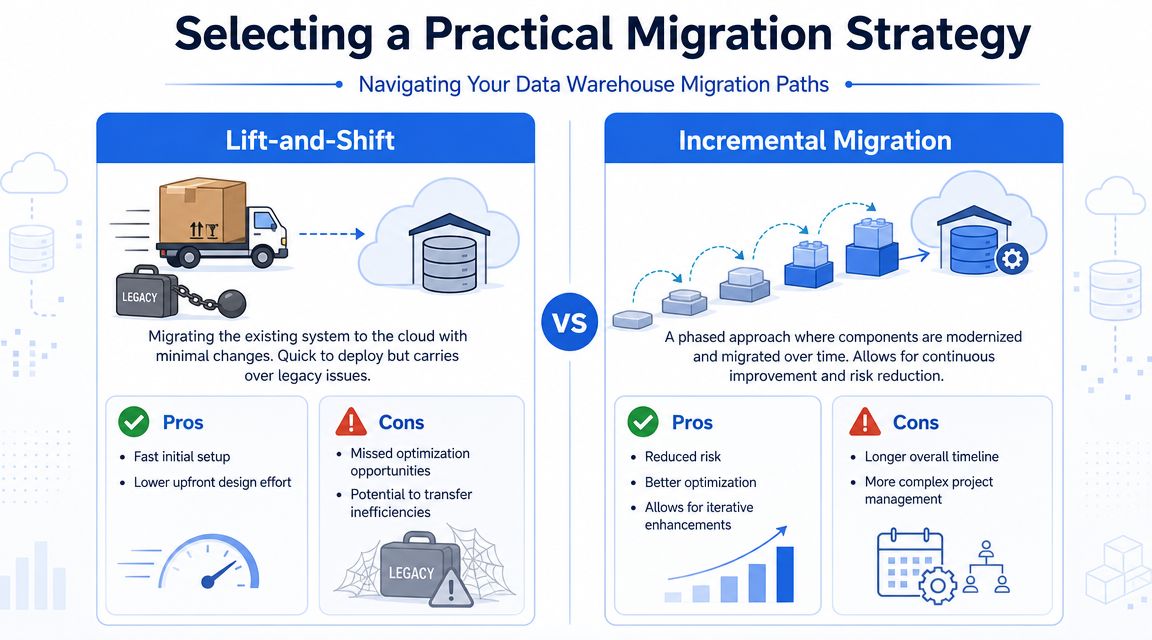
What each migration path optimizes for
Lift-and-shift buys speed. You move schemas, jobs, and workloads with limited redesign. That approach fits a forced data center exit, a licensing deadline, or a situation where the current warehouse is ugly but stable enough to keep serving the business.
The trade-off is plain. You also move weak data models, brittle ETL, unclear ownership, and expensive query patterns. Teams often call the project done because the platform changed, then spend the next year debugging the same issues at cloud prices.
Incremental migration buys control. You move in slices, often by business domain, use case, or critical workflow. That gives the team space to test assumptions, clean up painful transformations, and retire low-value assets instead of dragging them forward.
It also creates real delivery overhead. Two environments may run in parallel for months. Reconciliation work grows fast. If milestones are vague, business stakeholders start hearing "we're still migrating" as a reason for every delay.
Side-by-side migration buys confidence. The new environment runs in parallel with the old one for key workloads, and users move after outputs match closely enough for the business to rely on them. This is usually the safest pattern for finance reporting, executive metrics, and regulated workflows where a bad cutover has immediate consequences.
A second decision usually shows up halfway through planning. Which gaps should you solve with tooling, and which ones deserve custom engineering? This guide on buy versus build decisions in data systems is useful when you need to decide where standard tools are sufficient and where internal development is justified.
For a quick walkthrough of migration thinking, this short video is a good reset point:
Comparison of Data Warehouse Migration Strategies
Strategy | Best For | Pros | Cons |
|---|---|---|---|
Lift-and-Shift | Teams under time pressure, legacy environments that mostly work, urgent cloud exits | Fast initial setup, lower upfront design effort, less short-term disruption | Preserves technical debt, misses optimization opportunities, can move inefficient jobs unchanged |
Incremental | Mid-market companies that need reliability and redesign at the same time | Reduced risk, better optimization, iterative validation, benefits accrue in phases | Longer timeline, more coordination, dual-running can be operationally messy |
Side-by-Side | High-trust reporting environments, finance-heavy use cases, teams that need parallel validation | Safer cutover, easier user confidence building, cleaner rollback path | More expensive during overlap, duplicate maintenance, strong testing discipline required |
A realistic migration pattern for most mid-market teams
For a first major modernization, a hybrid approach is usually the one that survives contact with reality. Keep the stable, low-drama workloads moving. Redesign the few layers that create reporting disputes, break downstream dependencies, or consume disproportionate engineering time.
That usually means three practical choices:
Move trusted reporting flows with minimal change: If a pipeline is stable, well understood, and still useful, migrate it without turning it into a redesign project.
Rebuild the painful middle: Focus design effort on transformations with weak metric logic, long runtimes, manual fixes, or unclear ownership.
Use the migration to change operating habits: Add tests, code review, lineage, ownership, and release discipline while workloads are being moved.
This is the part many teams miss. Infrastructure migration alone can make the warehouse faster. It does not stop the data team from becoming a faster, more expensive bottleneck. The operating model has to change during migration, not after it, or the backlog simply rebuilds on top of newer tooling.
The migration plan should identify which assets are strategic, which are operational, and which should be retired instead of migrated.
That last category matters more than teams expect.
An old dashboard nobody trusts, a one-off pipeline built for a departed executive, or a duplicate mart with slightly different metric definitions should trigger a retirement conversation, not an automatic migration task. Good migration strategy is partly technical judgment and partly portfolio management. The teams that do this well are ruthless about what not to carry forward.
Tooling Governance and Security in a Modern Stack
A warehouse isn't a stack. It's one layer in a chain that includes ingestion, transformation, orchestration, cataloging, access control, documentation, and consumption.
That distinction matters because many modernization efforts stop after choosing Snowflake, BigQuery, Redshift, Synapse, or Databricks. The platform gets upgraded, but the surrounding workflow doesn't. Ingestion still breaks without notice. Transformation logic still lacks review. Metric definitions still live in Slack threads. Business users still don't know which dashboard to trust.
Your warehouse is only one layer
A durable modern stack usually includes a few clear capabilities:
Ingestion tooling: Managed connectors or pipelines that move source data reliably.
Transformation layer: A governed place for business logic, often with dbt or equivalent modeling discipline.
Catalog and documentation: Users need to find the right tables, owners, and definitions without asking around.
Consumption paths: BI, notebooks, SQL editors, natural-language query tools, and embedded workflows all serve different users.
Automation is where these pieces stop being a patchwork. Industry guidance on data warehousing modernization and automation points to automating metadata discovery, ingestion, transformation, loading, and SQL generation. That's the right instinct. Automation isn't just about saving engineering time. It's how you make standards repeatable.
Governance has to be built into the workflow
Governance often gets treated like a separate control function. In healthy systems, it's embedded into delivery.
That means access rules are enforced in the warehouse and downstream tools. Naming conventions are part of code review. Sensitive data handling is designed before self-service expands. Definitions for core metrics are versioned, reviewed, and visible. If you leave those tasks until after rollout, users will create their own workarounds and trust will collapse.
Gartner estimated that through 2025, 85% of data and analytics leaders will need to make data governance and data quality the top priority for enabling trustworthy analytics and AI, according to Hexaware's summary of that estimate. That lines up with what many teams discover too late. Once AI-assisted querying and self-service spread, bad governance doesn't stay contained. It scales.
If you're building these controls now, a practical reference on data governance implementation can help translate policy ideas into operating rules.
AI adds speed and governance debt at the same time
AI assistants make modernization more useful and more dangerous.
Natural-language querying lowers the barrier for business users. SQL generation speeds up analysts. Notebook automation helps engineering teams move faster. Those are real gains. But each one creates new questions that legacy governance models don't answer well.
Who owns AI-generated SQL that becomes business-critical?
Who reviews notebook logic before it influences a board metric?
How do you audit changes across prompts, generated code, and hand-edited transformations?
Those aren't edge cases anymore. They're normal operating questions.
One practical option in this layer is Querio, which connects directly to warehouse environments and supports natural-language querying plus notebook-style analysis on top of the existing data estate. That's useful for teams trying to reduce analyst mediation without replicating data into a separate system. But the product choice is secondary. The core requirement is that any AI-facing layer must inherit warehouse permissions, support reviewable logic, and fit your governance model instead of bypassing it.
Measuring Success and Calculating ROI
If the only win you can show is faster query execution, leadership will eventually ask why the project was so large.
The ROI case for data warehouse modernization is stronger when you measure business throughput. How quickly can teams answer important questions? How many requests still require analyst intervention? Which decisions moved from weekly reporting cycles into daily operating rhythm?

Measure operating model change, not just system performance
For mid-market companies, a key payoff is usually solving the human API problem. Rishabh Software's discussion of modernization payoff gets this right: success isn't just a faster cloud warehouse, but understanding how much analyst time is saved and which use cases are delegated safely to business users.
That means your measurement model should include both hard and soft signals.
Use infrastructure metrics, yes. Cost per workload, failed pipeline volume, and environment maintenance effort all matter. But also measure the behavioral outcomes that justify the platform:
Analyst deflection: Which recurring questions no longer become tickets.
Self-service adoption quality: Which teams answer routine questions themselves without creating metric drift.
Decision cycle compression: Whether recurring reviews happen with fresher data and fewer reconciliation meetings.
Trust indicators: How often stakeholders dispute numbers, definitions, or data lineage.
The best ROI story is usually not "we bought a faster warehouse." It's "we stopped using analysts as routers for every decision."
What leadership should actually track
Executives don't need a hundred KPIs. They need a short set that reflects whether modernization changed how the company operates.
A practical scorecard often includes:
Metric area | What to track | Why it matters |
|---|---|---|
Operating efficiency | Analyst time redirected from repetitive requests to higher-value work | Shows whether the team escaped ticket-driven reporting |
Time to insight | Time from business question to trusted answer | Captures the real business value of faster data delivery |
Self-service maturity | Number and type of use cases handled directly by business teams | Distinguishes true adoption from tool sprawl |
Governance health | Stability of core metrics, review coverage, access control consistency | Proves speed didn't create reporting chaos |
Tie these measures to a few concrete business processes. Product review. Marketing performance. Forecasting. Customer retention analysis. For people-related use cases, teams often underestimate the value of cleaner workforce analytics. If you're trying to uncover people intelligence from hiring, retention, and performance data, modernization only pays off when those users can access trusted definitions without a long analyst handoff.
A separate but related challenge is proving the value of AI-enabled analytics. If that's part of your rollout, this framework on measuring ROI for AI BI initiatives is a practical extension of the same idea.
Common Pitfalls and How to Avoid Them
Modernization projects rarely fail because the warehouse can't run queries. They fail because the company asks the technology to solve problems that are really about ownership, sequencing, and change management.
I've seen expensive programs stall for very ordinary reasons. Nobody agreed on the priority use cases. Leaders delegated the work entirely to IT. Domain teams weren't involved until validation. Self-service launched before metric governance existed. The migration looked active, but the operating model stayed fuzzy.

The failures are usually organizational
Start with business objectives. If nobody can say which decisions should get faster, more accurate, or less dependent on analysts, the project will drift into platform activity for its own sake.
Migration complexity is another common blind spot. Teams often underestimate data cleanup, transformation rewrites, and validation work. The problem isn't just moving data. It's proving that the new outputs are trustworthy enough to replace old ones.
Stakeholder alignment also breaks down more often than people expect. Finance, product, and go-to-market teams may all rely on the same source systems differently. If they aren't part of the design and testing process, disagreements surface late, when confidence is already fragile.
And then there's change management, which gets treated as optional until adoption stalls. New interfaces, new definitions, new ownership boundaries, and new access models all require training and communication. Users won't adopt self-service because the platform exists. They'll adopt it when they know what's trusted, what it's for, and what support path exists when something looks wrong.
A short red flag checklist
Use this checklist early. If several of these are already true, pause and fix them before expanding scope.
No clear business goals: Define a handful of measurable outcomes before platform work accelerates.
Migration scope is everything: Rank workloads by business importance and retire low-value reports instead of moving them by default.
Only engineers are in the room: Bring business owners into design, testing, and metric sign-off.
Training is deferred until go-live: Prepare documentation, support channels, and rollout plans while the system is being built.
Technology decisions ignore team maturity: Choose an architecture and toolchain your current organization can run well.
A final warning. Don't confuse activity with progress. A modernization project can produce architecture diagrams, tool contracts, and migrated pipelines for months without reducing the request queue at all. If the business still needs the same people to answer the same questions, you haven't modernized the operating model. You've just moved it.
Querio is one option for teams trying to turn a modern warehouse into usable self-service infrastructure instead of another reporting queue. It connects directly to warehouse environments and gives technical and non-technical users ways to query and work with live company data through natural-language access and notebook-style workflows. If your current challenge is less about migration and more about reducing analyst bottlenecks after the warehouse is already in place, it's worth looking at Querio.