Natural Language Querying Explained: A Practical Guide
Learn what natural language querying is, how it works on modern data warehouses, its real benefits, and how tools like Querio enable governed self-serve
https://www.youtube.com/watch?v=S5ezVVJhQmE
published
Outrank AI
natural language querying, NLQ, text to SQL, self-serve analytics, data warehouse AI
3a9be927-2a0c-492d-bf64-5190b12d0e9f

At 11 p.m., a product manager notices that a dashboard is almost answering the question they need. The revenue chart has the right time period, but not the region filter. The customer report has the right segment, but refunds are still included. So the PM opens Slack and sends an analyst another request.
By morning, the analyst is sorting through similar tickets, rebuilding familiar joins, checking date logic, and explaining the difference between a customer, an order, and a subscription for the third time that week. The issue isn't that the team lacks data. It's that the question has to pass through a narrow human queue before it can reach the warehouse.
Natural language querying is meant to change that workflow. It lets someone ask a business question in ordinary language and receive a warehouse-backed answer without first learning SQL or navigating every dashboard filter. But reliable NLQ isn't a magic chatbot and it isn't only a text-to-SQL feature. It's an interface category with a long history, a difficult enterprise accuracy problem, and a governance layer that determines whether an answer deserves trust.
Table of Contents
From Late-Night Analyst Pings to Questions You Just Type
The PM's question might sound simple: “What was net revenue by region last quarter, excluding refunds?” A person familiar with the warehouse knows that this sentence hides several decisions. Which revenue table is certified? Does “net revenue” use a standard metric? Are refunds stored as negative transactions, separate records, or a different event type? Which date defines the quarter?
An analyst usually resolves those questions manually. They inspect the schema, find the relevant tables, join them at the correct grain, apply the company's metric definition, run the query, and turn the result into a chart. The work may be routine, but routine work still consumes attention. It also creates a bottleneck: every stakeholder waits for the same small group of people to translate business language into database logic.
Natural language querying moves the first step closer to the person asking the question. Instead of selecting a prebuilt dashboard view or writing SQL from scratch, the PM can describe the analysis in the terms they use at work. A capable system then interprets the request, maps it to known data structures, executes a query, and presents the result in a readable form.
That shift can help several people:
Product managers can investigate adoption, conversion, or retention questions without opening a new analytics ticket for every variation.
Founders and executives can follow a decision with a focused question instead of waiting for a custom report.
Analysts can spend less time repeating standard retrieval work and more time defining metrics, investigating causes, and reviewing important decisions.
Data leaders can turn recurring business questions into governed, reusable access patterns rather than private analyst knowledge.
Practical rule: The value of NLQ isn't that everyone suddenly becomes a data engineer. The value is that fewer ordinary questions need a human translator before they can be answered.
The rest of the problem is making that translation dependable. Natural language querying has roots in early database interfaces, modern systems still fail on realistic enterprise tasks, and the difference between a useful deployment and an impressive demo usually sits in the semantic model, permissions, validation, and feedback loop.
What Natural Language Querying Actually Means
At the surface, NLQ looks like a search box or chat window. A user types, “What was net revenue by region last quarter, excluding refunds?” The system returns a table, a chart, or both.
Underneath, the system performs several translations. It must identify what the user wants, connect business terms to the right data objects, construct a database query, run it, and represent the result clearly. A useful working definition is:
Natural language querying is a governed translation layer between human questions and data stored in a warehouse or database.
The word governed matters. A free-form chatbot may produce plausible SQL, but a production NLQ system also needs approved metrics, access rules, validation checks, and a way for a user to inspect what happened.
Starting with the question
The phrase “net revenue” should map to a certified business metric, not to whichever column name looks close. “By region” identifies a grouping dimension. “Last quarter” requires a defined calendar or fiscal-period interpretation. “Excluding refunds” adds a business condition that may depend on transaction type, status, or a separate refunds model.
The system first parses the language and identifies those components. It then resolves them against the organization's data model. If the company has documented a metric called net_revenue, the system should use that definition rather than inventing a new calculation.
Turning meaning into a query
Once the intent is mapped, the system generates SQL or another database-native query language. The query might aggregate an approved revenue model by region, filter the relevant period, and exclude refund records according to the documented rule.
The warehouse executes the query. The system then formats the returned rows as a chart or table, ideally showing the generated query and any relevant assumptions. A trustworthy answer isn't only a number. It also gives the user enough context to understand how that number was produced.
The category predates current large language models. A 2024 review of natural-language interfaces to databases describes prototype systems appearing in the late 1960s and early 1970s, including work associated with E. F. Codd in the 1970s. The same review identifies WikiSQL and Spider, released in 2017 and 2018, as major large-scale, multi-domain benchmarks that changed how neural text-to-SQL systems were trained and evaluated.
For a practical explanation of the translation step itself, see how text becomes SQL in a natural-language data workflow.
How the Pipeline Turns a Question Into a Trusted Answer
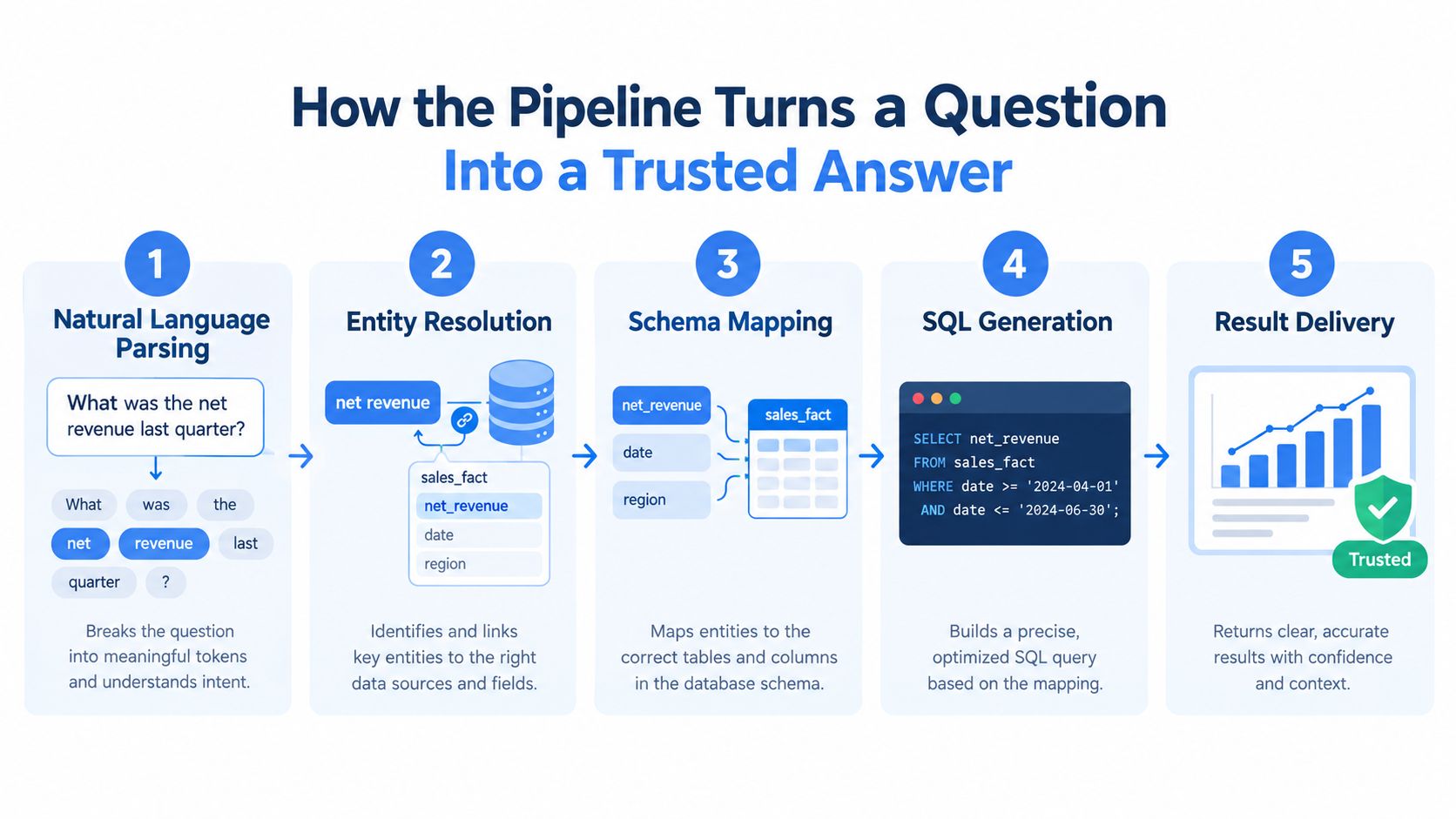
A production NLQ system usually follows a chain of decisions. Each stage can improve the answer, but each can also introduce an error. The running example, “What was net revenue by region last quarter, excluding refunds?”, shows why the model alone isn't enough.
The first three stages
Natural language parsing breaks the request into meaningful parts. The system identifies the metric, grouping, time expression, and exclusion. It needs to understand that “last quarter” is a temporal instruction, not a literal database value, and that “region” is probably a dimension rather than a filter.
Schema linking connects those concepts to approved warehouse objects. This is more than matching words to column names. “Net revenue” may correspond to a modeled metric, while “region” may require joining a customer, account, or location dimension. A semantic layer can provide the definitions, relationships, synonyms, and preferred join paths that a language model can't safely infer from names alone.
Query generation turns the mapped intent into SQL or a warehouse-native expression. The system must apply the correct date boundaries, aggregate at the intended grain, use the certified revenue logic, and exclude refunds without accidentally removing valid revenue records.
Execution, validation, and delivery
The warehouse then executes the generated query. A mature system can inspect whether the query ran, whether the result has an unexpected shape, and whether the output conflicts with known constraints. Runtime checks don't prove that the business interpretation is correct, but they can catch invalid references, failed joins, empty outputs, and other warning signs.
Finally, result delivery turns rows into a chart, table, summary, or notebook output. The user should be able to see the answer, the filters applied, and ideally the SQL or metric definition behind it. That transparency gives an analyst a way to audit the result and gives a non-technical user a way to ask a better follow-up question.
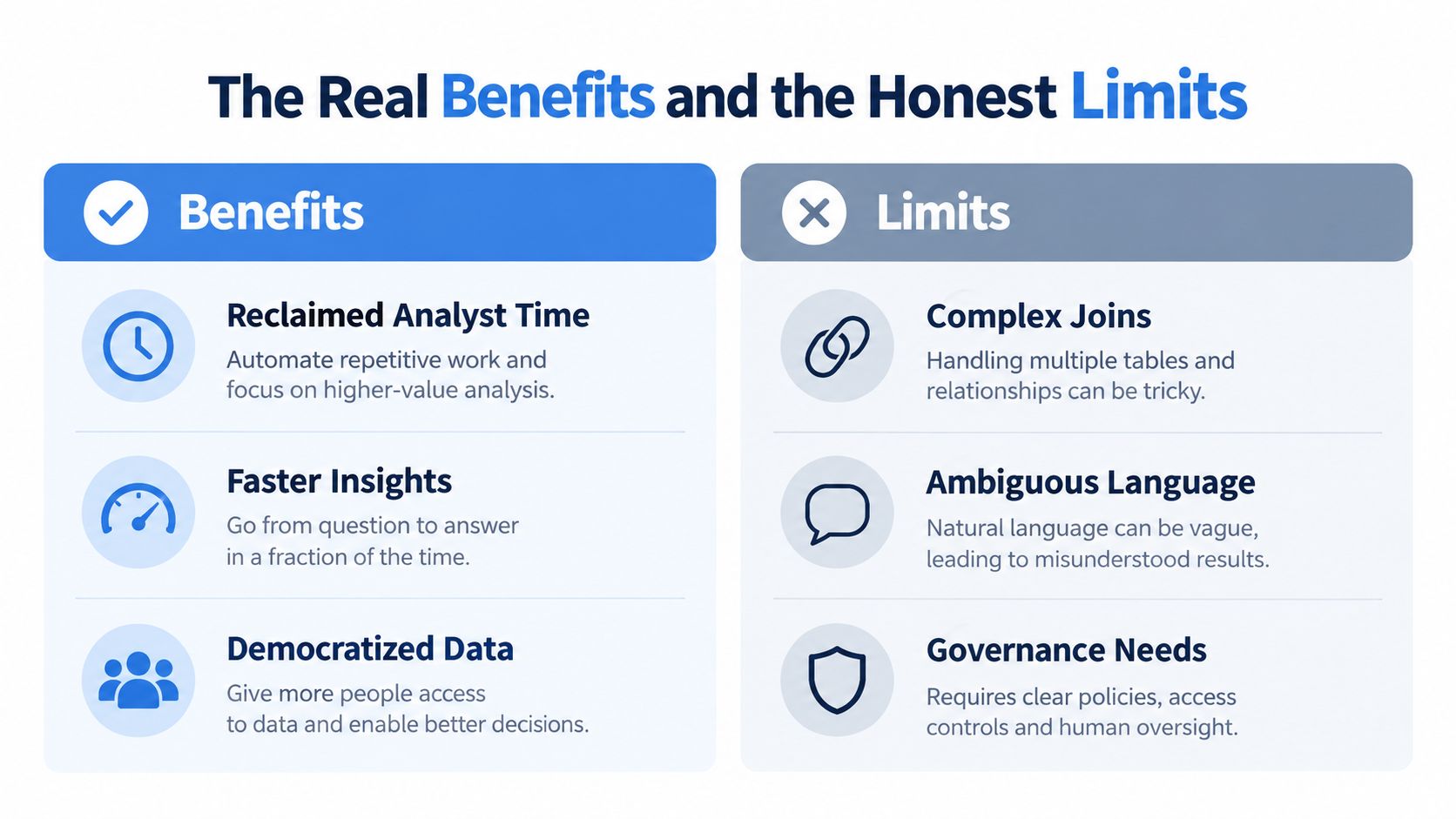
The governance layer sits beside every stage. Identity propagation must determine which data the user may access. Metric definitions must prevent two people from interpreting “revenue” differently. Validation must detect technical and semantic warning signs. Cost controls must prevent a conversational interface from issuing uncontrolled warehouse queries.
The architectural distinction is important. As this discussion of governed AI-generated SQL explains, generating syntactically valid SQL is only one part of producing an answer people can use.
The Real Benefits and the Honest Limits
A mid-market software company may receive dozens of questions about pipeline, activation, expansion, or churn. Many requests are variations of known patterns. If the warehouse contains documented models and approved definitions, NLQ can let a PM ask a focused question, inspect the result, and continue exploring without creating a new ticket for every filter.
That creates practical benefits:
Analyst capacity: Analysts can redirect repetitive retrieval requests toward metric design, investigation, and quality review.
Faster exploration: A user can test a follow-up question while the business context is still fresh, rather than waiting for a report to be rebuilt.
Lower onboarding friction: A new hire can use familiar business language while learning the company's data definitions.
More consistent metrics: A semantic layer can route different phrasings to the same certified calculation.
Those gains depend on the underlying system. They don't come from conversational wording alone.
Where enterprise systems break
Consider “How many active customers do we have?” A subscription business may define active as having a current contract. A product team may define it as logging in recently. A finance team may count accounts with recognized revenue. If the semantic layer doesn't settle the definition, an NLQ system can produce a clean answer to the wrong question.
The same problem appears with joins. A model may generate a query that runs successfully but duplicates revenue because it joins an order-level table to an event-level table. It may use a plausible column name, choose the wrong SQL dialect, or apply calendar logic where the business uses fiscal periods. These errors are dangerous because the output can look polished.
The enterprise gap is measurable. On the BEAVER enterprise benchmark, advanced agentic frameworks reportedly reached only 10.8% execution accuracy, while the best weighted scores on multi-turn interactive tasks stayed below 30%, and per-task costs could exceed $1, according to the 2026 NOVAS workshop benchmark. A separate 2026 benchmark audit reported error rates of 52.8% for BIRD and 66.1% for Spider 2.0-Snow.
These results don't mean NLQ has no place in production. They mean a public benchmark score can't substitute for testing against your own schemas, metric definitions, permissions, and recurring questions.
Implementation Considerations on a Modern Data Warehouse
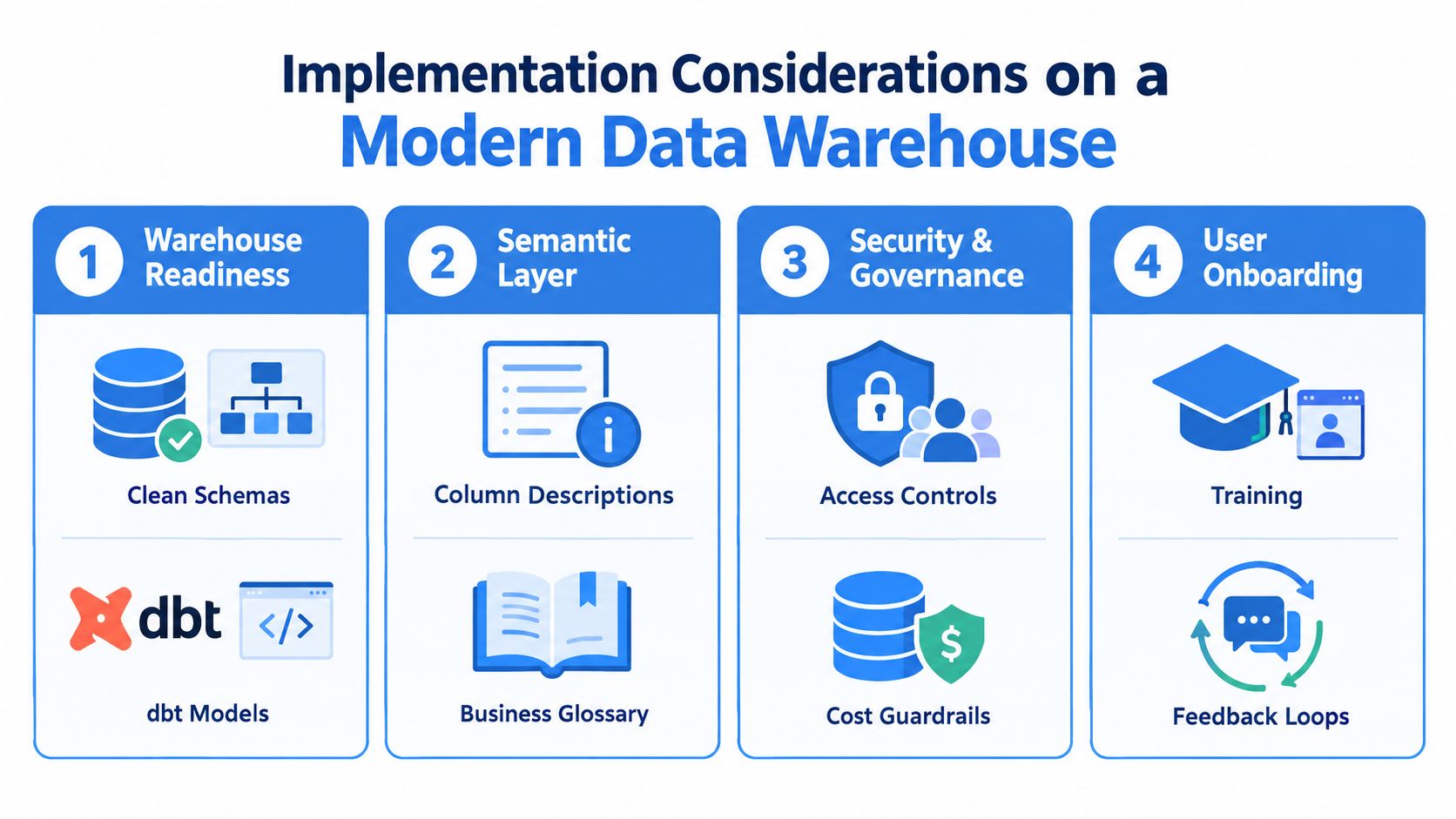
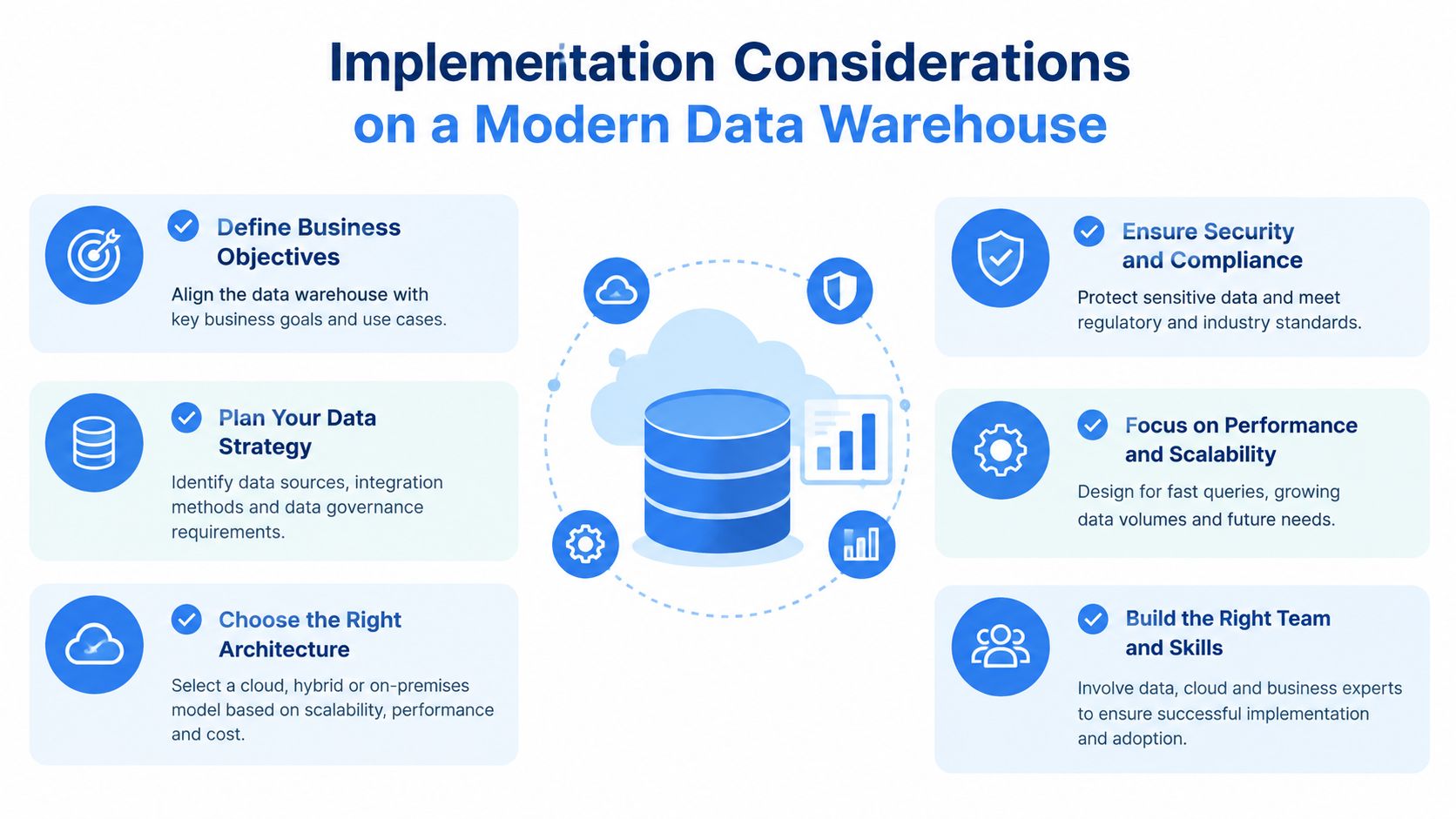
A data lead shouldn't begin by opening a chat box to the entire warehouse. Start with the environment that will make answers interpretable and safe.
Prepare the warehouse
Clean schemas and documented transformation models give the system something reliable to work with. Column descriptions should explain business meaning, not merely repeat technical names. A model called fct_orders tells a machine very little about grain, status handling, or whether canceled orders remain in the table.
Create a small initial domain, such as subscription revenue or product engagement. Document the relevant tables, keys, dimensions, dates, and exclusions. Add a cost guardrail before broad access, so a poorly scoped question doesn't trigger an unnecessarily expensive scan.
Define the semantic layer
The semantic layer should answer questions that raw schema inspection cannot:
Metrics: What exactly counts as net revenue, active customer, or conversion?
Dimensions: Which region, product, plan, or account field should users mean?
Relationships: Which joins preserve the intended grain?
Time logic: Which date and calendar should the system use?
Synonyms: Which business phrases refer to the same certified object?
This work also improves human analytics. The data team gets a shared vocabulary, analysts stop embedding definitions in private queries, and users receive more consistent answers across interfaces.
Apply security to the execution path
Permissions must follow the person asking the question. Row-level security, column masking, and role-based access can't disappear because an LLM generated the query. A sales manager may see assigned accounts, while a finance user may see recognized revenue. The same policies should apply whether the request came through SQL, a notebook, a dashboard, or natural language.
A recent study of governance-aware querying across modern lakehouse features highlights the need for runtime validation, semantic layers, consistent metric definitions, and support for platform-specific capabilities such as time travel. It also reports that schema-aware approaches in an Apache Iceberg setting reached only 67% accuracy, which reinforces the point that schema awareness alone doesn't solve operational reliability.
Evaluate before exposure
Build a golden question set from real analyst requests. Include easy retrieval questions, ambiguous terms, multi-table analysis, time comparisons, permission-sensitive requests, and questions that should produce a clarification rather than an answer.
Track whether the generated query executes, whether the returned result matches the expected result, and whether the interpretation is acceptable to a domain owner. Run the set after changes to models, prompts, semantic definitions, and underlying warehouse structures.
The final layer is observability. Keep query logs, generated SQL, validation outcomes, user corrections, and confidence signals. When a user fixes “active customer,” update the glossary or metric definition instead of hiding the correction in a one-off prompt. For a practical design pattern, see how to make a data warehouse conversational.
How Querio Changes the Equation for Mid-Market Teams
The main difference between a legacy BI tool with an NLQ add-on and a warehouse-native approach is where the meaning of the data lives. In a dashboard-centered architecture, the conversational interface may maintain a separate semantic model from notebooks, SQL work, and transformation code. That separation creates another place for definitions and permissions to drift.
A warehouse-native workflow keeps the question closer to the systems analysts already use. A PM asks for net revenue by region. The system resolves that request against the same certified definitions available to the data team, generates an auditable query, and returns the result in a workspace where technical users can inspect or modify the analysis. Non-technical users get guided questions and readable results. Technical users get visibility into the SQL rather than a black-box chart.
The approach doesn't remove the need for modeling. It makes the existing warehouse investment more accessible and gives the data team one execution path to review.
Dimension | Legacy BI + NLQ | Querio |
|---|---|---|
Semantic definitions | Often maintained in a BI-specific model that can drift from warehouse logic | Uses warehouse context alongside notebooks and data workflows |
User experience | Primarily chat or dashboard interaction | Plain-language questions with notebook-based analysis |
Technical review | Generated logic may be hidden behind the visualization | SQL can be inspected and edited by technical users |
Access model | Governance may require separate BI administration | Permissions can be designed around the warehouse execution path |
Follow-up analysis | Often returns a dashboard result or saved view | Supports continued work in the same notebook-oriented environment |
Best fit | Teams centered on fixed dashboards and packaged reporting | Mid-market teams that want self-service access without separating analytics from warehouse work |
The trade-off is straightforward. A warehouse-native NLQ system rewards teams that have invested in clean models, clear metrics, and access controls. It isn't a shortcut around data hygiene. Querio provides plain-English questions that become SQL-backed answers from live warehouse data, with support for conversational access across platforms such as Snowflake, BigQuery, and Postgres. Its architecture is described in this overview of natural-language chat across data platforms.
A Practical 90-Day Rollout You Can Start This Quarter
A controlled rollout keeps the team from confusing adoption with accuracy. Use three phases, and make each phase earn the next.
Days 1 to 30
Audit one warehouse domain rather than the entire company. Review schema descriptions, transformation models, grain, date fields, joins, and existing access policies. Then select three high-frequency questions that analysts already answer repeatedly, such as revenue by region, new activated accounts, or usage by plan.
Record how those questions are answered today, including the expected metric definition and the analyst review required. The first gate is readiness. If the team can't explain the correct answer and its source tables, it isn't ready for NLQ exposure.
Days 31 to 60
Create the semantic layer for the selected domain. Add certified metrics, dimensions, synonyms, approved joins, and clarification rules. Wire in role-based access and test that restricted fields remain restricted when the system generates SQL.
Assemble a known-good evaluation set of 50 questions, including valid requests, ambiguous requests, complex joins, and questions that should be refused or clarified. Run the system before giving it broad access. The second gate is evidence: proceed only when the data team understands the failure modes and can distinguish a technical error from a business-definition error.
Days 61 to 90
Invite a small pilot group of PMs and founders. Ask them to use real questions, not artificial demos. Capture failed queries, corrections, unexpected terminology, and requests that reveal missing metrics. Feed those findings into the glossary, models, permissions, and evaluation set.
Set a service target that fits your team, such as answering 80% of questions without analyst intervention, but treat it as an internal operating goal rather than a universal benchmark. Review trust as well as coverage. If users receive fast answers but don't believe them, pause expansion and improve transparency.
The first move tomorrow is simple: choose one domain, one metric, and one question. Trace that question from plain language to semantic mapping, generated SQL, warehouse execution, validation, and final result. If that path is dependable, expand deliberately. If it isn't, the failure will show you exactly which part of the system needs work.
Querio gives teams a warehouse-connected way to ask business questions in plain English, inspect SQL-backed answers, and continue analysis in a notebook-oriented workflow. Visit Querio to see how natural language querying can help your team move from repeated analyst requests toward governed self-service data access.