Mastering Data Warehouse Integration in 2026
Learn modern data warehouse integration patterns like ETL, ELT, & streaming. Discover best practices for governance, security, and self-serve analytics.
https://www.youtube.com/watch?v=QmaNucXFYd8
published
Outrank AI
data warehouse integration, data integration, elt vs etl, data architecture, querio
656794c7-c1a7-4155-83d9-1c64761d4d18

You know you need a warehouse when the weekly metrics meeting turns into a negotiation. Marketing pulls pipeline from one SaaS dashboard. Product reports activation from another. Finance exports CSVs from the ERP. The data team spends its time reconciling definitions, rerunning ad hoc queries, and explaining why three “revenue” numbers all differ for legitimate reasons.
That's the point where data warehouse integration stops being a backend project and becomes an operating model problem. The hard part isn't only getting data into Snowflake, BigQuery, or Redshift. The hard part is building a system that gives teams trusted access without making every question wait in an analyst queue.
Table of Contents
Why Data Warehouse Integration Is More Than Moving Data
A lot of mid-market teams still treat data warehouse integration as plumbing. Connect the CRM. Sync the billing system. Load product events. Build a few models. Then everyone assumes reporting will sort itself out.
It won't.
If the integration layer only moves data, the business still has the same problem in a nicer package. Teams still ask the data group for joins they can't perform, definitions they don't trust, and dashboards they can't change. The warehouse fills up while the operating model stays stuck.
The urgency is real. One industry analysis projects the global data warehouse market will reach $7.69 billion by 2028 and grow at a 24.5% annual rate, which signals how central warehousing and integration have become to enterprise decision-making (existBI's market overview). That growth matters less as a market headline than as a practical signal. More companies are standardizing around the warehouse as the place where operational data becomes analytics infrastructure.
The real problem is workflow design
The companies that get value from data warehouse integration do one thing differently. They design the warehouse so people can use it without filing a ticket for every answer.
That starts with common language. If your team needs a quick primer on how integration terms differ in practice, the Breaker integrations glossary is a useful reference because it gives non-specialists shared vocabulary before architecture discussions drift into acronyms.
It also requires confronting silos directly. Most growing companies don't have a tooling problem first. They have a fragmentation problem first. Marketing owns campaign data, product owns event data, finance owns revenue logic, and nobody owns the semantic layer across all three. That's why a warehouse initiative usually stalls unless it's paired with a plan for definitions, ownership, and access. A useful framing is this guide on breaking down data silos, which maps the organizational side of the issue.
Practical rule: If your integration project reduces analyst handoffs, it's working. If it only centralizes raw tables, you've moved the bottleneck, not removed it.
What success actually looks like
A good integration strategy produces three outcomes:
Trusted inputs: Source data lands consistently and predictably.
Usable models: Business entities like customer, account, order, and subscription have agreed logic.
Safe self-service: Teams can answer routine questions on their own without bypassing governance.
That's why data warehouse integration is bigger than ETL jobs. It's the mechanism that turns disconnected systems into a shared analytical product.
Understanding Key Data Integration Patterns
The integration debate often gets flattened into ETL versus ELT. That's too narrow for how modern teams function. A working stack usually includes several patterns side by side because different workloads need different latency, control, and maintenance trade-offs.
Modern data integration has expanded beyond nightly batch jobs into ETL, ELT, streaming, application integration via APIs, and data virtualization, driven by lower-latency business needs and the need to unify varied data into one customer view (Qlik's integration guide).
Why patterns exist at all
Use a kitchen analogy. Some kitchens prep every ingredient before service. Others bring ingredients to the station and let the chef assemble dishes to order. Some also run a pass where hot plates move continuously to the dining room. Data integration patterns work the same way.
Here's a visual summary that's worth scanning before you choose tools:
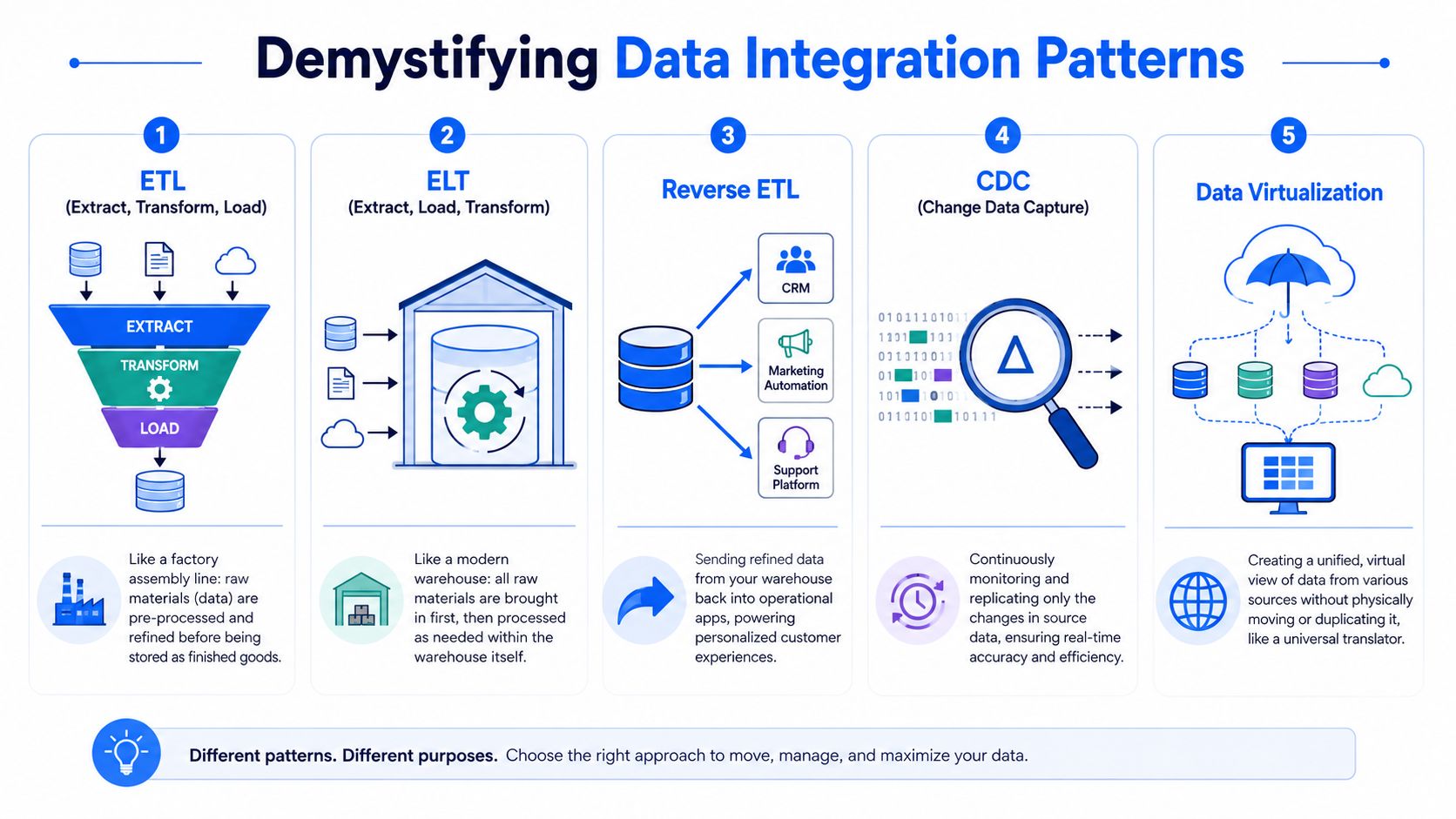
A practical view of each pattern
ETL is the prep kitchen. Data gets extracted from source systems, transformed in a staging layer, then loaded into the warehouse in a curated form. ETL is useful when the target schema must be tightly controlled before data lands, especially for finance reporting or legacy integrations that depend on strict conformance.
ELT flips that sequence. Data lands first, then gets transformed inside the warehouse. This has become the common cloud pattern because warehouse compute is strong, SQL talent is easier to find than specialized ETL engineering talent, and raw data remains available for reprocessing. If you want a practical companion read on this stack design, this article on the modern analytics stack and ETL ELT patterns is a good next step.
CDC, or change data capture, focuses on what changed rather than reloading whole tables. It's useful when source databases update constantly and you want fresher warehouse tables without repeatedly moving the same records.
Streaming integration is the hot line. Events flow continuously, which makes sense for product telemetry, fraud signals, support events, or operational monitoring. The trade-off is operational complexity. Streaming gives speed, but it also exposes schema drift, late-arriving events, and ordering issues faster.
Reverse ETL sends curated warehouse data back into operational tools like CRM, lifecycle messaging, or support platforms. It matters when the warehouse becomes the system where customer state is modeled, but business teams still work inside operational apps.
Data virtualization creates a unified access layer without always moving the data physically. That can help with exploratory access across systems, though it doesn't remove the need for governance or clear semantic definitions.
For founders or small teams comparing practical options early, data integration for startups gives a decent market view of how these categories show up in real tool selection.
A short explainer can also help if your stakeholders need a non-technical walkthrough:
A simple comparison
Pattern | Best fit | Main strength | Main weakness |
|---|---|---|---|
ETL | Controlled reporting pipelines | Strong pre-load standardization | Slower to adapt |
ELT | Cloud warehouse analytics | Flexible and fast to iterate | Governance moves downstream |
CDC | Transactional source sync | Efficient updates | Harder failure handling |
Streaming | Event-driven use cases | Low latency | More operational overhead |
Reverse ETL | Activating warehouse data | Puts modeled data into business tools | Can spread bad definitions quickly |
Data virtualization | Cross-source access | Less duplication | Performance and consistency can vary |
Use patterns by workload, not by fashion. Batch for reconciliations, ELT for high-volume SaaS extraction, streaming for event-driven decisions, and reverse ETL only after your business definitions are stable.
Choosing the Right Integration Architecture
The right architecture usually isn't one pattern. It's a blend of patterns matched to the way your company works. The mistake I see most often is choosing architecture from a vendor demo instead of from source behavior and business expectations.
Start with the business requirement
A practical architecture review starts with four questions:
What are the sources? SaaS apps behave differently from transactional databases and event streams.
How fresh does the data need to be? Daily finance reporting and product alerting shouldn't share the same latency target.
Who will maintain it? A SQL-heavy analytics team should design differently from an engineering-led platform team.
What breaks if data is wrong for a few hours? The answer determines how much validation and observability you need.
The ELT pattern has become standard for cloud warehouses like Snowflake and BigQuery because data is loaded first and transformed with SQL in the warehouse, which reduces latency and preserves raw data for reprocessing. The trade-off is that governance and data quality controls move further downstream into the warehouse layer (Fivetran's ELT guide).
That trade-off matters more than the acronym. ELT is attractive because it speeds up ingestion and simplifies connector logic. It also creates a temptation to dump raw data quickly and postpone hard data modeling decisions. Teams that do that often end up with a warehouse full of semi-usable tables and a growing backlog of cleanup work.
Use a hybrid architecture on purpose
Most mid-market companies should expect a hybrid design:
ELT for SaaS platforms such as CRM, billing, support, and ad platforms.
CDC or scheduled replication for transactional databases where updates happen throughout the day.
Streaming for event-heavy product data only when someone will consume low-latency outputs.
Reverse ETL or application syncs after core models are stable enough to push into business workflows.
A simple decision view helps:
Decision factor | Better fit |
|---|---|
SQL-centric analytics team | ELT-heavy warehouse design |
Strict pre-load controls | ETL for selected pipelines |
Continuous source updates | CDC or streaming |
High business tolerance for stale data | Batch pipelines |
Operational app activation | Reverse ETL after modeling |
The architecture itself isn't the whole answer. The ownership model has to match it. If every transformation lives with one central team, the architecture will scale more slowly than the warehouse can.
For a deeper look at warehouse design choices behind these patterns, this guide to data warehouse architectures is a practical reference.
Building for Performance Security and Governance

A mid-market team usually notices integration strain in business workflows before anyone calls it an architecture problem. Finance asks why yesterday's revenue changed at noon. Sales stops trusting the pipeline and exports CRM data to spreadsheets. Product managers wait on one analyst because the warehouse is technically available but hard to use with confidence.
That is the true test for this layer of the stack. Performance, security, and governance determine whether the warehouse becomes a shared operating system for the business or another queue managed by the data team.
Performance problems usually start as trust problems
Warehouse performance issues rarely begin with an outage. They show up as dashboards that refresh late, queries that behave differently at peak hours, and analysts building local extracts because the warehouse feels inconsistent.
Three patterns cause most of this:
Long transformation chains: Deep model dependencies make refresh timing fragile and slow down root-cause analysis.
Mixed workloads on shared compute: Ingestion jobs, scheduled transforms, and ad hoc BI queries compete for the same resources.
Weak observability: Teams learn about stale data from business users instead of freshness checks, alerts, or run metadata.
The fix is not just “buy more compute.” Separate workloads where the platform allows it. Set freshness targets by domain, because finance, product, and support rarely need the same latency. Monitor table-level health so teams know whether a dataset is late, broken, or still processing.
That discipline reduces another common failure mode. The data team stops acting like a human status page.
Security has to be designed into access, not added after the fact
The fastest way to slow adoption is to make every new dataset a permission exception. Security works better when access patterns are defined early and tied to roles, data sensitivity, and business use. Guidance from NIST's Cybersecurity Framework aligns with this approach: identify assets, control access, protect data, detect issues, and keep auditability in place.
For a first scalable warehouse integration, that usually means:
Analysts get broad read access to curated and modeled layers.
Business users get governed access through semantic models, BI tools, or approved data products.
Engineers and platform owners get operational access to pipeline logs, job history, and lineage.
Sensitive raw data stays restricted to a small set of approved roles.
Many mid-market companies often create avoidable friction. They land raw data fast, skip classification, then spend months retrofitting row-level rules, masking policies, and approval flows. The warehouse remains technically secure, but access becomes slow and inconsistent, which pushes users back to ad hoc extracts and side-channel reporting.
A better design supports self-service without giving everyone raw-table access.
Governance is the operating model behind self-service
Governance sounds abstract until a metric breaks. Then the missing pieces become obvious. No one knows who owns the table, whether the source changed, or which downstream dashboards inherited the error.
In practice, governance comes down to a few working controls:
Lineage that shows how a KPI was produced from source through transformation.
Data quality checks for freshness, uniqueness, null handling, and schema drift.
Named ownership for important tables, definitions, and incident response.
Cataloging so business users can find approved datasets without asking the data team first.
This is the difference between a warehouse that scales and one that centralizes every question. If users can discover trusted datasets, understand definitions, and see whether data is current, they need less intervention from engineers and analysts. That is the operational goal many teams miss when they frame integration as only an ETL versus ELT decision.
For teams formalizing those controls, this checklist of data warehouse best practices is a useful reference.
A Phased Roadmap for Data Warehouse Integration
A mid-market warehouse project usually goes off track the same way. Leadership asks for one platform, one migration, and one launch date. The data team responds by trying to integrate every source at once, then spends the next six months answering edge-case questions, patching broken assumptions, and manually explaining numbers.
A phased roadmap avoids that trap. The goal is not to load data into a warehouse as fast as possible. The goal is to stand up a delivery model that keeps working as more teams depend on it, without turning every new request into a ticket for engineering.
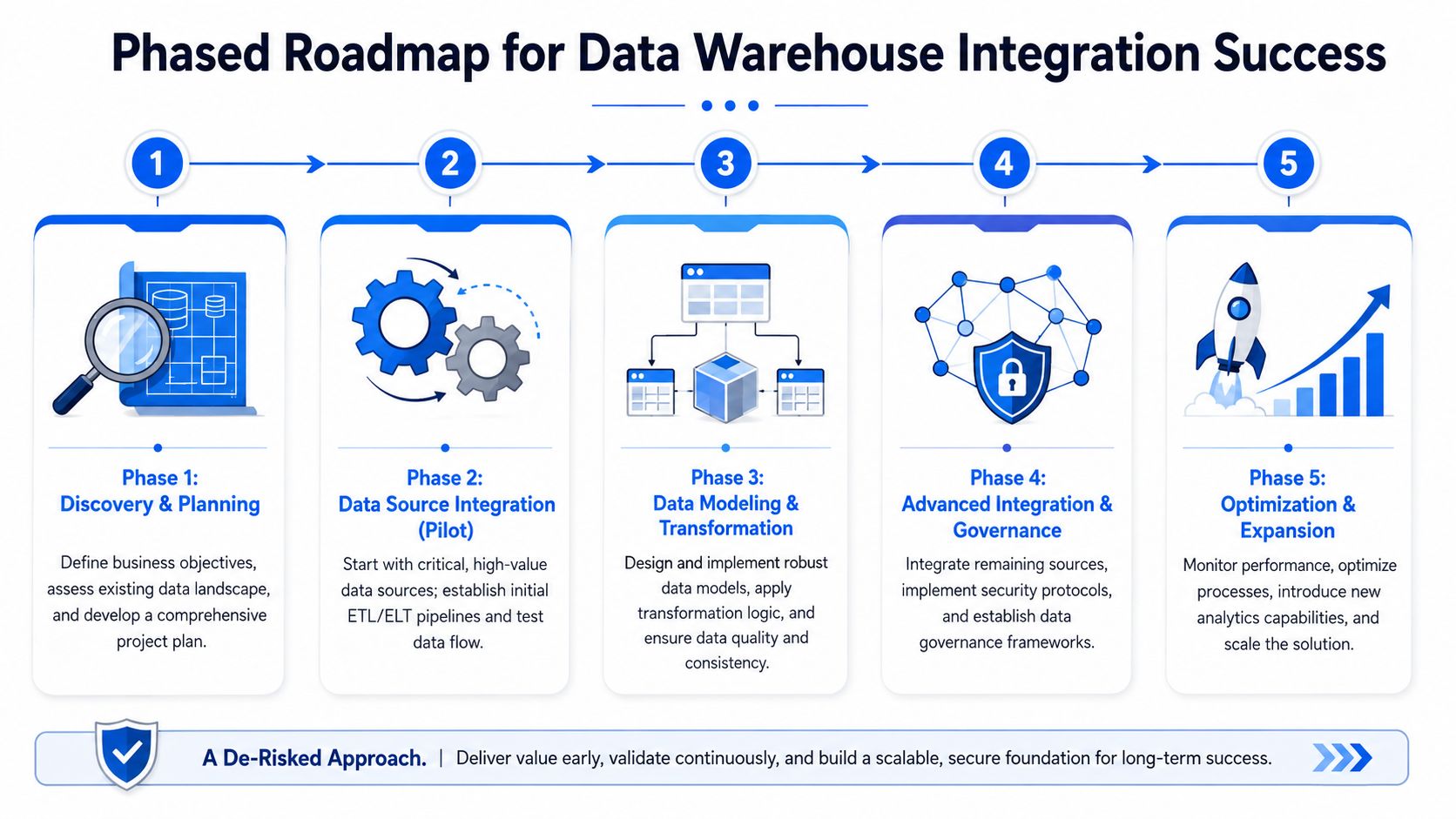
Phase one starts with operating scope
Start with one business workflow that already causes friction. Revenue reporting is a common candidate because it touches CRM, billing, finance, and often a spreadsheet layer nobody fully trusts. Pick a use case with visible business value, known pain, and a clear owner outside the data team.
Then audit the sources involved in that workflow. Capture the system owner, extraction method, refresh expectations, record volume, change history, and known quality issues. This step sounds administrative, but it sets the limits of the design. A stable finance export and a fast-changing product event stream should not be treated as the same integration problem.
Teams that run data programs in phases generally reduce delivery risk because they validate scope, ownership, and rollout assumptions before broad implementation. For a practical change-management view of phased delivery, Prosci's guidance on implementing change in phases is useful.
Build a pilot that proves the operating model
The first release should answer a real business question and prove that the team can support it without constant intervention. That is a different bar than landing rows in warehouse tables.
A good pilot usually includes:
A narrow decision scope
Define the exact output the business needs, such as a weekly bookings view or a marketing-to-revenue funnel, not a general reporting upgrade.A small source set
Bring in only the systems required for that output. Extra sources create more reconciliation work and more stakeholder debate.A defined validation process
Reconcile the pilot against current reports, finance close files, or operational exports. Expect disagreements. Resolve them now, while the scope is still manageable.A limited user group Release to a few users who will rely on the data. Watch where they get blocked, which definitions confuse them, and which requests still come back to the data team.
An explicit support threshold
Do not expand because the pipeline ran for two weeks. Expand when the questions are dropping, the logic is stable, and users can find and use the output without a custom walkthrough.
That last point matters. If every pilot user still needs an analyst to interpret the tables, the warehouse is becoming a better backend for the same old service model.
Scale by domain, not by connector count
Once the pilot is stable, add the next domain with the same discipline. Do not measure progress by how many integrations are live. Measure it by how many business processes now run on trusted, reusable datasets.
A practical rollout often looks like this:
Discovery and scoping
Confirm the business owner, the decision to support, and the minimum sources required.Ingestion and storage setup
Load raw data with enough history and metadata to support reprocessing when source logic changes.Modeling and reconciliation
Build the smallest useful set of transformed tables, then compare them against operational reality.Controlled release
Publish the outputs to a defined audience with clear metric definitions, usage guidance, and known limitations.Operational handoff
Add monitoring, ownership, and issue response before declaring the domain complete.Domain expansion
Repeat the pattern for the next area only after the current one is stable.
This is slower in the first month. It is much faster by month six.
Use the same onboarding standard for every new source
Source onboarding should be repeatable. If each system gets handled as a one-off project, maintenance cost climbs fast and documentation quality drops just as adoption starts to rise.
Use a checklist like this:
Business owner confirmed: Someone outside data owns the meaning, priority, and acceptance criteria.
Use case mapped: The team knows which model, report, or workflow will consume the source first.
Refresh requirement defined: Daily, hourly, or event-based. Match the load pattern to the business need.
Schema risk reviewed: Flag unstable fields, nested structures, late-arriving records, and deletion behavior.
Validation plan written: Identify the record counts, aggregates, and business checks that will confirm correctness.
Access pattern assigned: Separate raw ingestion, curated models, and user-facing datasets.
Support owner named: Someone is responsible when the source changes or a metric breaks.
Release communication prepared: Users know what is new, what is replacing old reporting, and where to find the trusted version.
A phased roadmap works because it limits blast radius while the team is still learning. More critically, it builds toward self-service on purpose. Each phase should leave behind a dataset, definition, and access path that business users can rely on without opening another ticket.
Common Pitfalls and How to Avoid Them
The most expensive failures in data warehouse integration usually aren't technical. Pipelines run. Tables populate. Dashboards render. But the business still doesn't rely on them.
The warehouse works but the team doesn't
One common failure pattern goes like this. The company centralizes data into a clean warehouse. Access stays tightly restricted because the data team is trying to protect quality. Every new question still arrives as a request. Soon the warehouse becomes a better storage layer for the same old queue.
Avoid that by separating safe self-service access from unrestricted warehouse access. Business users rarely need raw schemas. They need governed models, clear metric definitions, and interfaces that don't require writing joins against source-shaped tables.
Another mistake is underestimating maintenance. SaaS APIs change. Product events drift. Finance logic evolves after close reviews. If nobody owns pipeline upkeep, the warehouse decays unnoticed until teams start rebuilding shadow reports in spreadsheets.
Trust breaks before pipelines do
A technically correct warehouse can still fail if users don't trust it.
Watch for these warning signs:
Definitions aren't written down: Two teams use the same metric name for different logic.
Quality checks are informal: Validation lives in Slack threads and memory.
Executive sponsorship is thin: Nobody outside data enforces adoption of the trusted layer.
Rollout is too broad: Teams see inconsistencies in early releases and write the whole system off.
The fix is boring but effective. Publish ownership. Test key models. Reconcile visibly. Deprecate old reports on purpose instead of letting them linger forever.
A warehouse earns trust when users can tell where a number came from, who owns it, and when it last refreshed.
The final pitfall is treating access control as success. Restriction protects data, but it can also freeze it. If your integrated warehouse only serves the central team, you built infrastructure, not a strategic resource.
Beyond Integration The Shift to Self-Serve Analytics
The under-discussed part of data integration is the operating model. The main challenge for mid-market companies is delegating self-service without breaking governance, because that determines whether the warehouse becomes a shared asset or just another queue (TDWI's discussion of the data team bottleneck).
That's the standard I'd use to judge a warehouse project. Not whether ingestion is elegant. Not whether the modeling layer is technically pure. The question is whether product, finance, operations, and go-to-market teams can answer routine questions without waiting days for someone in data.

The warehouse should be a product not a queue
A scalable model treats the warehouse as a product with layers:
Raw ingestion for auditability and reprocessing
Curated transformations for business logic
Governed interfaces for exploration, reporting, and activation
In that model, the central data team still matters. It just does different work. Instead of answering every request manually, the team owns platform quality, semantic standards, permissions, and enablement.
What the final mile should look like
Tooling drives changes in the operating model. Once integration is stable, teams need a way to work directly on top of the warehouse without bypassing controls. Options in the market span BI tools, notebook environments, and warehouse-native query layers. Querio fits into that final mile by deploying AI coding agents on top of the existing warehouse and giving teams a collaborative notebook-style interface for querying and analysis without turning analysts into a permanent ticket desk.
That's the shift that matters. Good data warehouse integration doesn't end when pipelines are green. It ends when the business can explore trusted data safely, the data team maintains infrastructure instead of acting like a human API, and decisions move faster because access no longer depends on who has time to pull a report.
If your team already has a warehouse but still lives in an analytics queue, Querio is worth evaluating as the self-service layer on top of that foundation. It connects directly to warehouse data, lets technical and non-technical users work in a collaborative notebook workflow, and helps data teams move from request fulfillment to governed enablement.

