Monthly Active Users: Define, Calculate, Track
Master monthly active users (MAU): define, calculate, and track for real growth. Learn SQL patterns, avoid pitfalls, and optimize your DAU/MAU ratio.
published
Outrank AI
monthly active users, product metrics, saas metrics, user engagement, data analysis
087b583f-e2dc-4ccf-9a67-8fff827eec12

Most advice about monthly active users starts with the count. That's the mistake.
A rising MAU line can make a board deck look healthy while the product gets weaker underneath. Teams celebrate more "active" users even when those users only logged in, clicked around, and left without reaching the core value of the product. In B2B SaaS, that gap matters even more because one shallow user and one highly engaged user should not be treated as equivalent signals of health.
The scale of the metric is part of why this gets sloppy. As of April 2026, the global social media user base reached 5.79 billion monthly active users, or about 69.9% of the world's population, and the typical global user engages with 6.52 different social platforms each month, according to DataReportal's social media user analysis. When a metric is this widely used, people assume it's standardized. It isn't. "Active" is always a product decision first and a reporting decision second.
Table of Contents
Your Monthly Active Users Are Probably Lying to You
If your definition of monthly active users is "anyone who logged in during the month," your MAU is probably overstating product health.
That definition survives because it's easy. Engineering can ship it quickly. Finance can understand it. Founders can put it in a board deck without explaining nuance. But easy definitions create expensive mistakes. A user who logs in because they got an email reminder is not the same as a user who completed the core workflow your product exists to deliver.
In practice, bad MAU definitions hide three problems at once:
Weak activation: New users appear active before they ever reach value.
Shallow retention: Returning users inflate the count without showing meaningful engagement.
Board confusion: Leadership sees stable or rising MAU and assumes the product is healthy.
Practical rule: If a user can qualify as active without touching your product's core value, the metric is too loose.
Many startup teams drift into vanity metrics. They count presence instead of progress. The number goes up, but the product doesn't become more essential to customers.
The worst version of this shows up in B2B SaaS. A company can have steady MAU while account quality falls. Users might still open the app, but fewer people complete reports, update records, run workflows, or collaborate inside the product. That's not healthy usage. It's inertia.
A useful MAU definition should create discomfort. It should exclude users you'd be embarrassed to call engaged. If tightening the definition causes MAU to drop, that's not a reporting problem. That's a more honest baseline.
What Monthly Active Users Really Means
Monthly active users sounds simple, but each word carries a decision. Often, the count is only debated after the dashboard is live. The definition, though, needs to be settled before any tracking begins.
The practical definition is this: monthly active users are unique user IDs that performed at least one qualifying, value-signaling action within a rolling 30-day window, as described by Count's MAU methodology guide.
A gym analogy helps. Memberships are registered users. People who work out are active users. If you judged the gym's health by total memberships alone, you'd miss whether customers were getting value. Product analytics works the same way.
Monthly is not calendar month
A lot of teams use calendar months because finance reports that way. That's fine for executive summaries, but it's poor for operational analysis.
A rolling 30-day window is better for trend analysis because it smooths month-end artifacts. You don't get false jumps because one month has more days than another, or because a campaign landed on the last day of the month. Product teams need continuity. Rolling windows provide it.
That matters most when you compare MAU to related metrics such as churn or revenue per active user. If your denominator shifts because the time window is inconsistent, the rest of your reporting gets noisy fast.
Active has to mean value
The most important word in monthly active users is active. Counting logins usually fails because a login only proves access, not value.
A stronger definition uses a product-specific action such as:
For a BI product: Creating a report, running a query, or sharing a dashboard.
For a CRM: Updating records, moving an opportunity stage, or logging a meaningful activity.
For a workflow tool: Completing a task, approving a request, or triggering an automation.
These aren't universal examples. The right event depends on when your product delivers its actual promise.
Count actions that signal value received, not actions that signal the app merely opened.
This decision also shapes downstream metrics. If your MAU includes low-intent logins, retention looks stronger than it is and revenue efficiency looks better than it is. If your MAU includes only meaningful interactions, the trend line may look smaller, but it will be far more useful.
A simple comparison makes the difference clearer:
Metric choice | What it really measures | Common problem |
|---|---|---|
Login-based MAU | Access | Inflates engagement |
Page-view MAU | Browsing | Counts curiosity as value |
Core-action MAU | Value delivery | Harder to define, much better signal |
For B2B SaaS, this is critical. Usage can be less frequent, but each session often carries much more business value. That's why a core-feature definition is usually the right one.
How to Calculate MAU in Your Data Warehouse
Most MAU mistakes don't come from SQL. They come from weak event definitions upstream. Once the event logic is sound, the warehouse query is usually straightforward.
If your team is still formalizing KPI definitions, this guide to developing startup metrics is useful because it forces the uncomfortable but necessary conversation about what each metric is supposed to drive.
A warehouse first SQL pattern
Assume you have an events table with at least these fields:
user_idevent_nameevent_timestamp
Assume your qualifying events are things like report_created, query_executed, and dashboard_shared.
A basic pattern looks like this:
The important parts aren't fancy:
Use a date spine: That gives you a complete daily series, including days with no events.
Count distinct users, not events: MAU is about breadth of engaged users.
Filter to qualifying actions only: The metric's integrity resides in this.
If your source data is spread across tools and event streams, it helps to centralize the logic inside a proper warehouse model first. This overview of what a data warehouse is is a useful reference for product managers who need to understand why these metrics should be built on curated source-of-truth tables rather than ad hoc exports.
A notebook workflow for product teams
Not every team wants to express the first draft in SQL. A notebook workflow works well when product, analytics, and engineering need to inspect the same logic together.
The process is simple:
Connect to the warehouse. Pull only the event columns you need.
Load data into a dataframe. Keep timestamps,
user_id, andevent_name.Filter to the rolling window. Use the last 30 days relative to each reporting date if you're building a trend.
Restrict to qualifying events. This should mirror the business definition exactly.
Count unique users. That's the MAU.
Break out segments. Add account tier, workspace, plan, or role if you want quality slices.
A notebook is especially helpful for testing edge cases. You can inspect users who barely qualified, users with duplicated identities, or users who triggered multiple events in the same day. Those checks catch definition drift early.
The right implementation pattern is the one your team can rerun consistently without reinterpretation.
That's the operational standard. Not elegance. Not complexity. Consistency.
Beyond MAU with Engagement and Stickiness Ratios
A single MAU number tells you how many users crossed the threshold. It doesn't tell you how often they come back. That's why good product teams pair monthly active users with a stickiness view.
The most common one is the DAU/MAU ratio, which measures average daily active users divided by monthly active users over the same period. A ratio of 20% means one in five monthly users engages daily, and Mixpanel's MAU benchmark guide notes that B2B SaaS typically targets 15–25%, while consumer apps on Android can average 34.27%.
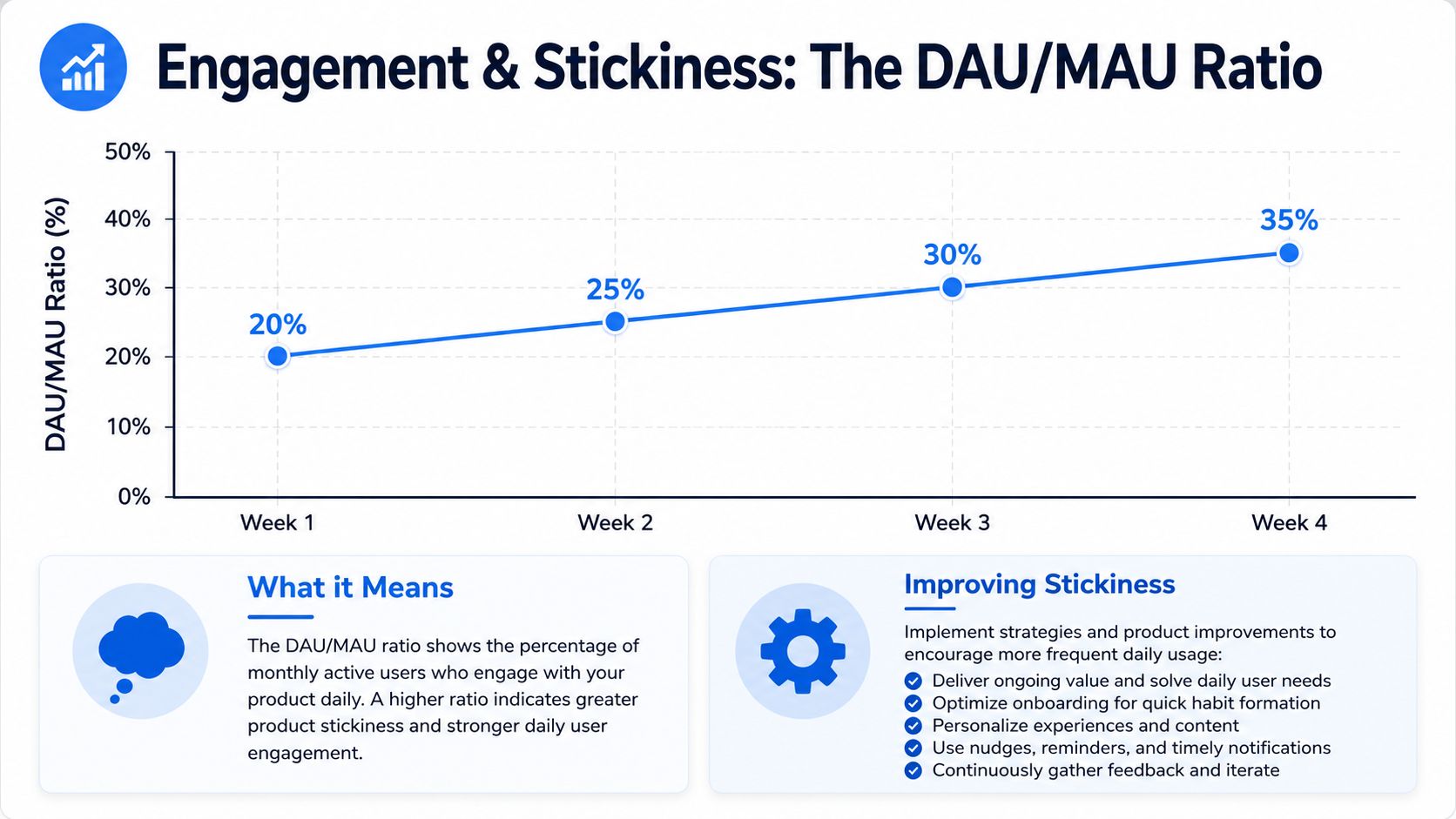
What the ratio tells you
This ratio answers a different question from MAU.
MAU asks, "How many users received value at least once in the period?"
DAU/MAU asks, "How regularly is this product part of their routine?"
That distinction matters because different products have different natural rhythms. A social product should usually earn frequent engagement. A B2B product used for recurring operational work may have a lower but still healthy cadence. If your team expects daily behavior from a product built for periodic workflows, you'll misdiagnose healthy usage as weak retention.
A simple interpretation table helps:
Signal | Likely interpretation |
|---|---|
Higher MAU, falling DAU/MAU | Broader reach, weaker habit |
Flat MAU, rising DAU/MAU | Same user base, deeper usage |
Rising both | Growth with improving engagement |
Falling both | Fewer users and weaker return behavior |
This is why stickiness belongs beside MAU in every serious dashboard.
Why context matters more than the number alone
The ratio is useful, but it still isn't self-explanatory. A low ratio isn't automatically bad. A high ratio isn't automatically good.
Some teams create bad incentives by pushing for more daily usage even when their product shouldn't be opened every day. That's how you get noisy notifications, shallow activity loops, and feature clutter designed to manufacture visits rather than deliver outcomes.
A better approach is to compare the ratio with the product's intended workflow and retention profile. For a B2B SaaS team, the question isn't "Can we make everyone log in more?" It's "Are the right users coming back at the cadence that reflects durable value?"
If you're building a broader operating view of SaaS health, this resource on retention and ARR per head is a helpful complement because it forces MAU into the same frame as commercial efficiency rather than letting it sit alone as a growth vanity metric.
A healthy ratio supports the product's usage pattern. It doesn't impose a pattern the product doesn't naturally have.
WAU can help here too, especially for products that people use weekly rather than daily. But the core principle stays the same. Frequency only matters when it reflects real value, not ritualized checking.
Instrumenting Your Product for Accurate Tracking
You can't fix a bad MAU definition in a dashboard. You have to fix it in the event model.
Most reporting problems start before analysis. Product says "active means value." Engineering logs page loads. Data inherits the mismatch and spends the next few quarters explaining why nobody trusts the metric.
Start with a tracking plan, not code
Write down the definition before anyone touches instrumentation. A simple tracking plan should answer:
What exact event qualifies a user as active
Which object the event applies to
Who owns the definition
What exceptions do not count
How the event should be named across clients
That last point matters more than teams expect. If web sends report_created, mobile sends create_report, and backend automation writes report_generated, you'll spend more time normalizing events than interpreting them.
A structured product analytics platform can help, but the tooling doesn't replace the discipline. Teams still need a clear event taxonomy and explicit ownership.
Implementation advice: If product, engineering, and data can't explain the event definition in the same sentence, don't ship the metric yet.
Choose identifiers and event properties carefully
A clean MAU depends on a stable user_id. Session IDs are useful for behavioral analysis, but they are not suitable as the identity layer for active user metrics. Anonymous traffic can matter during acquisition analysis, yet MAU usually becomes misleading when anonymous sessions and authenticated users get mixed into one count.
Event properties matter too. Include the fields that will later help you segment quality without redefining the pipeline:
Account or workspace ID: Needed for B2B account-level reporting.
Plan or tier: Useful when free and paid usage should not be mixed casually.
Role: Admin, editor, viewer, analyst, and other roles often behave differently.
Object metadata: Report type, project type, workflow type, or feature area.
Be selective. Teams often log every available property, then discover half of them are inconsistent across platforms. A smaller, stable schema beats a rich but unreliable one.
Two implementation habits save a lot of pain later:
Version your tracking plan. Definitions change. Keep a record.
Create test events in staging and validate production parity. A correct schema in documentation means nothing if the live payload differs.
When the instrumentation is sound, MAU debates become strategic. When the instrumentation is loose, every meeting turns into a data trust meeting.
The Most Common MAU Pitfalls and How to Fix Them
The biggest MAU reporting failure is treating all active users as equally valuable.
That sounds obvious, but teams still present one headline number as if it describes product health on its own. In B2B SaaS, that shortcut is costly. Baremetrics notes that 60% of B2B SaaS firms now tie MAU to revenue efficiency, yet many still rely on a simple login = active definition, which can overstate health and distort forecasting.
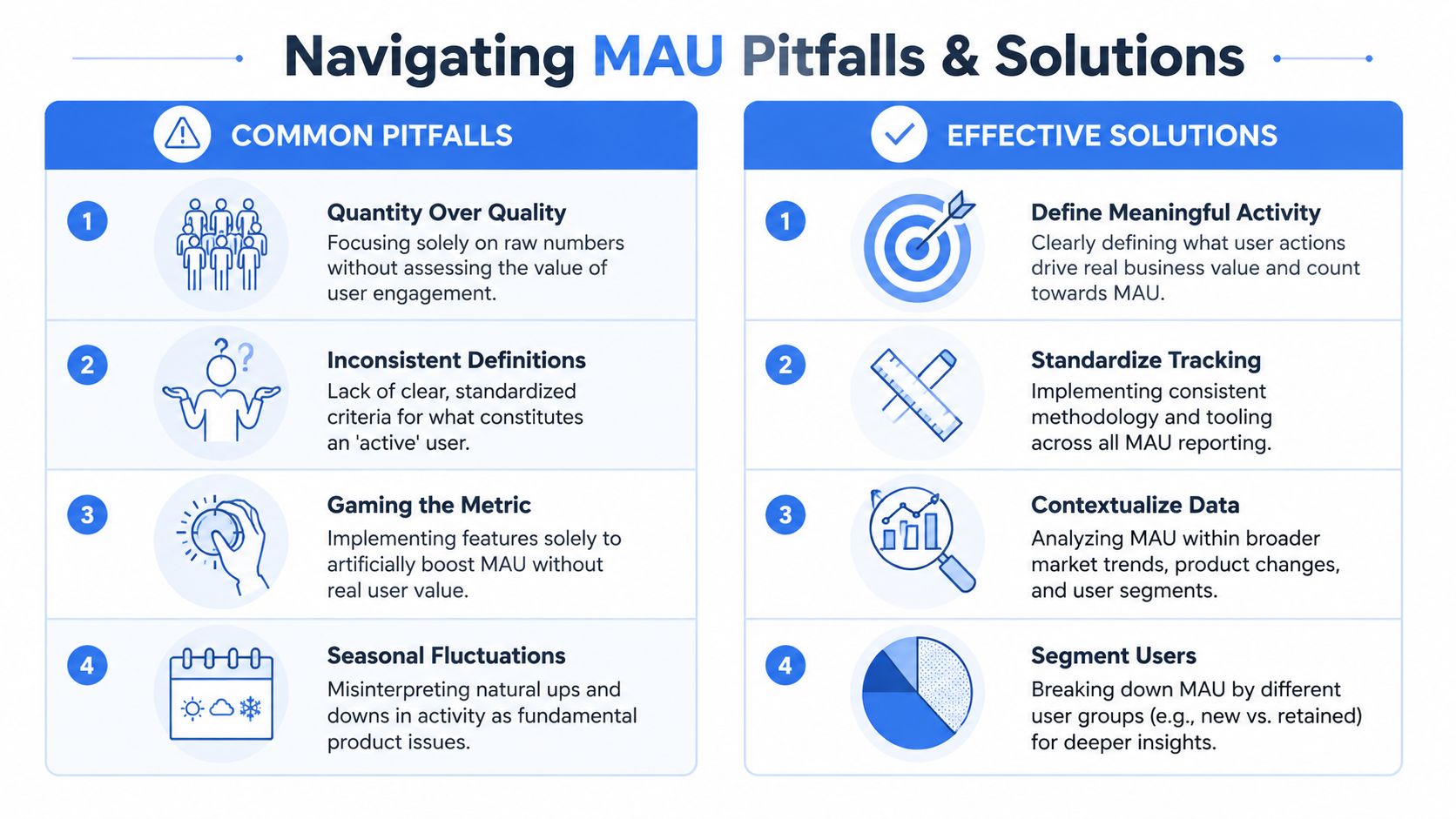
Where teams go wrong
The most common failures are usually operational, not theoretical:
Counting access instead of value: Logins, page loads, and email-driven returns sneak into the active definition.
Mixing user types: Free-tier users, paid admins, occasional viewers, and automation-triggered activity end up in one blended MAU.
Ignoring cohort behavior: Overall MAU rises, but existing cohorts are weakening.
Reporting at the wrong level: Seat-based B2B products often need both user-level and account-level views.
One of the easiest ways to fool yourself is with replacement effects. High-value users can leave or downgrade while a larger volume of shallow users enters the product. Total MAU looks stable. The business gets worse.
That problem gets harder when the data foundation is weak. If event names are inconsistent or identifiers aren't clean, the metric becomes vulnerable to accidental inflation. A disciplined approach to improving data quality isn't separate from MAU reporting. It's a prerequisite.
What better reporting looks like
A better MAU practice doesn't discard the metric. It upgrades it.
Start by segmenting the count into views that leadership can use:
Segment | Why it matters |
|---|---|
New vs retained actives | Shows whether growth is acquisition-led or retention-led |
Paid vs free actives | Prevents cheap volume from masking revenue weakness |
Core feature users vs peripheral feature users | Distinguishes value realization from casual activity |
Power users vs light users | Reveals depth inside the active base |
Then add narrative discipline. If MAU rises but engagement depth weakens, say so plainly. If a tighter active definition causes a visible drop, explain that the reporting got better, not worse.
Report MAU like a diagnostic metric, not a victory metric.
This is also where board reporting often needs a reset. Executives don't need more dashboards. They need a definition they can trust over time. That usually means fewer top-line numbers and better segmentation.
A strong operating standard looks like this:
Use a core-action definition.
Keep the rolling window consistent.
Segment by value, not just by user count.
Review definition changes explicitly.
Pair MAU with frequency and retention context.
When teams do this well, MAU stops being a vanity stat and becomes a useful proxy for value delivery.
Transforming MAU from a Number to an Insight
Monthly active users is a good metric when it answers a hard question accurately. It becomes a bad metric when it answers an easy question vaguely.
The useful version of MAU isn't "How many people touched the product?" It's "How many unique users crossed the threshold that proves the product delivered value?" That shift sounds small, but it changes how teams instrument events, write SQL, read dashboards, and explain product health to leadership.
The checklist is short:
Define active as a value-signaling action
Use a rolling 30-day window
Count unique users, not event volume
Segment for quality
Read MAU alongside stickiness and retention
Treat definition changes as governance decisions
If you remember one thing, make it this: a lower-quality MAU is worse than a lower MAU. Inflated counts make teams complacent. Honest counts make teams sharper.
The best product managers learn this early. They stop asking whether MAU is up and start asking whether the users inside MAU are the users the business specifically wants more of.
If you want your team to answer those questions without turning the data team into a ticket queue, Querio helps you work directly on top of your data warehouse with AI-powered analysis and notebooks, so product, data, and leadership can explore metrics like MAU with more speed and less reporting friction.


