Mastering Common Table Expressions: A 2026 Guide
Learn what Common Table Expressions (CTEs) are, how to write them, and why they're essential for modern data analysis. A guide for analysts.
https://www.youtube.com/watch?v=QNfnuK-1YYY
published
Outrank AI
common table expressions, sql cte, data analytics, sql best practices, recursive cte
6ad91367-28ee-4918-9d17-74b2952aca4c
You open a dashboard query, make one small filter change, and the whole thing breaks. The SQL is packed with nested subqueries, reused logic copied into three places, and aliases like t1, x, and final2 that tell you nothing. You're not really analyzing data at that point. You're defusing a bomb.
That's where common table expressions become more than a syntax trick. They give you a way to turn tangled SQL into a sequence of named steps that another analyst can read, review, and trust. If you work in Snowflake, BigQuery, or another cloud warehouse, that matters even more because teams often build analytics collaboratively, move fast, and revisit the same business logic constantly.
Table of Contents
The End of Unreadable SQL
Most analysts meet common table expressions after they've already suffered through bad SQL.
A common scenario goes like this. A product analyst inherits a retention query that started simple, then grew over months. One person added a join for billing status. Another inserted a nested subquery for first-touch attribution. Someone else copied that same logic into a different branch to calculate activated users. The result still runs, but nobody wants to touch it.
The problem isn't only readability. It's that nested SQL hides business logic. When filters, joins, and aggregations are buried inside parentheses, you can't quickly answer basic questions like: where are churned users excluded, which session table drives activity, or whether a date condition is applied before or after aggregation.
Unreadable SQL usually isn't “advanced.” It's just logic with no visible structure.
That's why common table expressions help so much. They let you name each intermediate step in plain English. Instead of one giant statement, you get a sequence like eligible_accounts, daily_sessions, activated_users, and final_summary. The query starts reading like an analysis plan instead of a puzzle.
For analysts who are still getting comfortable with query structure, this is also the fastest path out of subquery overload. If you've been practicing the basics in guides on how to write SQL queries, CTEs are often the point where your SQL starts becoming maintainable, not just executable.
Why teams trust CTE-based queries more
A good CTE query does three things at once:
Makes intent visible: Each named block tells reviewers what the step is supposed to do.
Shrinks debugging time: You can inspect one logical stage at a time.
Reduces copy-paste logic: You define a transformation once, then reference it cleanly.
That matters in product analytics because your queries rarely stay static. Stakeholders ask for weekly active users by plan tier. Then they want only self-serve accounts. Then they want activation measured from first workspace created instead of signup date. CTEs make those edits safer.
What Is a Common Table Expression
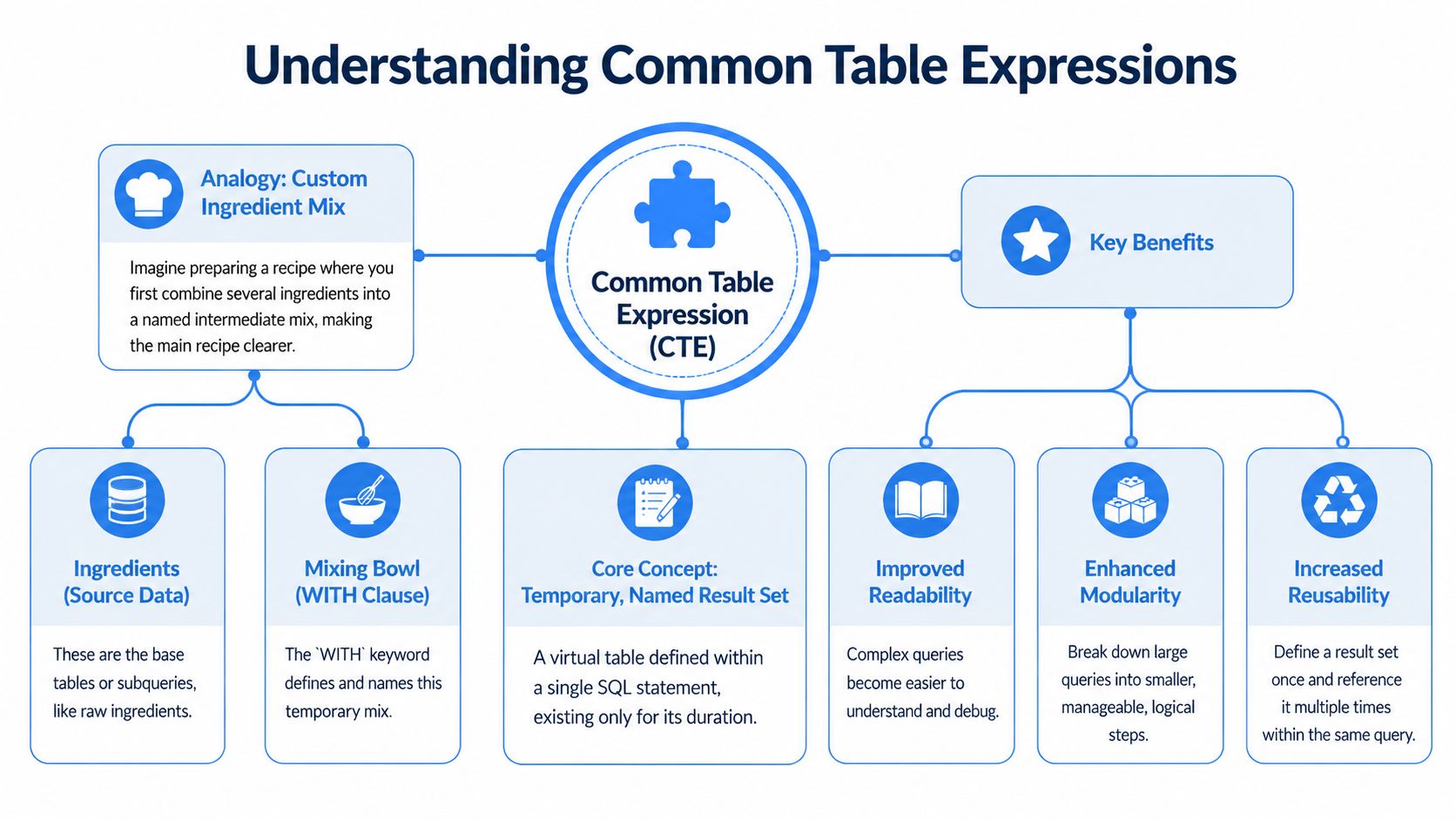
A common table expression, usually shortened to CTE, is a temporary named result set you define at the start of a SQL statement with the WITH clause. Microsoft's documentation describes a CTE as a temporary named result set that exists only within the scope of a single SELECT, INSERT, UPDATE, MERGE, or DELETE statement, and it can also be used in a CREATE VIEW definition. That scope model became a key part of how major SQL implementations standardized reusable query blocks without creating persistent tables, as described in Microsoft's Transact-SQL documentation on CTEs.
Think of a CTE like a named prep bowl
If you cook often, this analogy tends to stick. Say you're making tacos and keep using the same spice blend. You could list cumin, paprika, chili powder, garlic powder, and salt every single time. Or you could combine them once, call it taco_spice_mix, and use that name in the recipe.
A CTE works the same way.
You take a chunk of SQL logic, usually a SELECT, give it a name, and then refer to that name in the main query. The database treats it like a temporary logical dataset. You didn't create a real table. You created a labeled step inside one statement.
Here's the shape:
That naming matters more than people think. When you write high_intent_accounts instead of burying that logic in a subquery, you're documenting the business meaning of the step.
Why scope matters
A CTE only lives for one statement. That's useful because it keeps your database clean. You don't leave behind helper tables, scratch objects, or one-off views just to organize query logic.
It also changes how you should think about them. A CTE is not a permanent modeling layer. It's a way to structure reasoning inside one query.
Practical rule: Use a CTE when you want to make one statement easier to read, test, or reuse internally. Use a permanent model or temp table when the logic needs a longer life.
For analysts, this is the sweet spot. You can break down a warehouse query into business-sized pieces without asking engineering to create a new object. In modern cloud workflows, that's often the fastest way to move from question to trusted answer.
Writing Your First CTE Syntax and Examples
The easiest first win with common table expressions is replacing a nested subquery that technically works but takes too long to understand.
The basic pattern
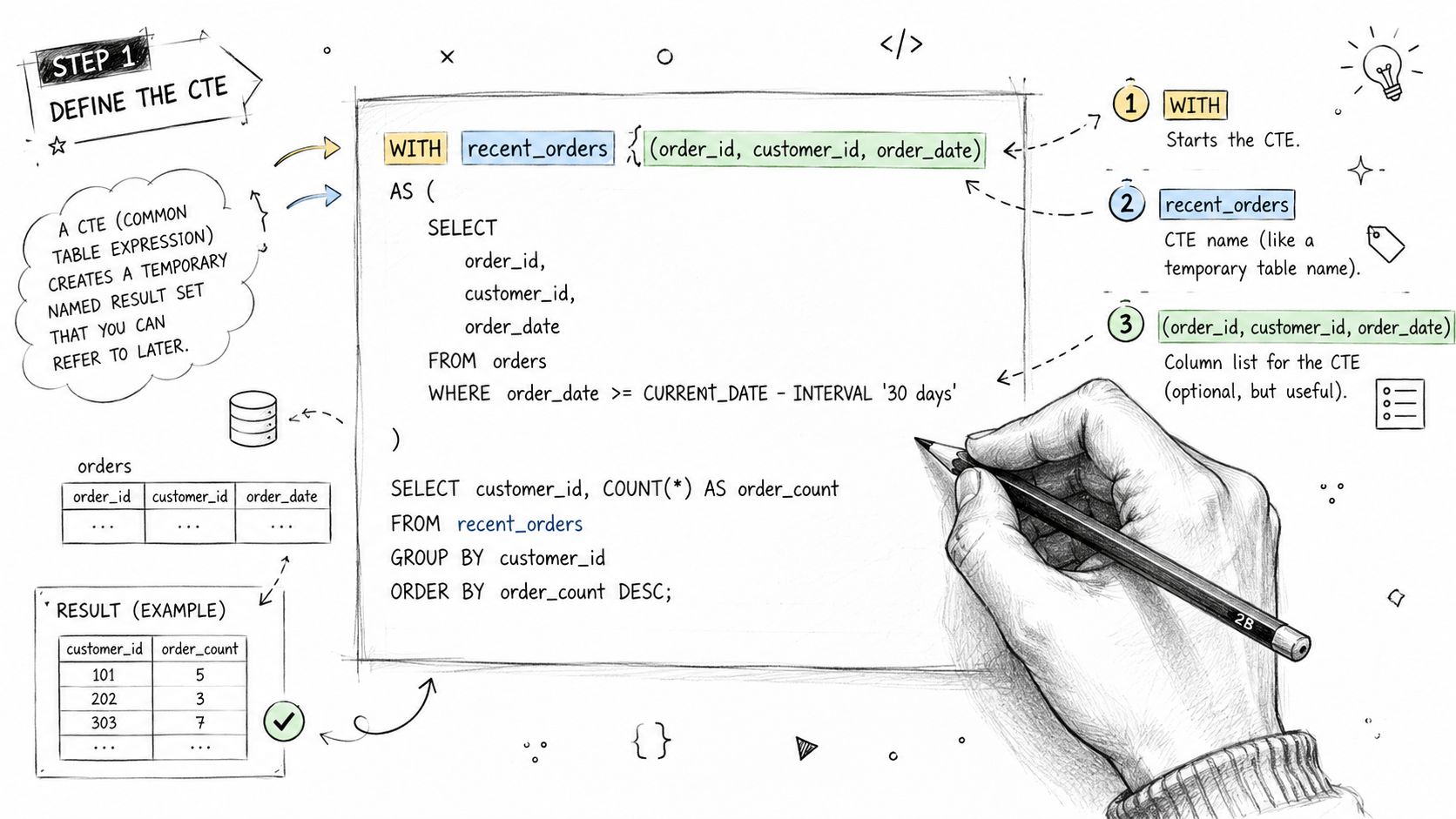
Here's a clean non-recursive CTE template:
The moving parts are simple:
WITHstarts the definitioncte_namelabels the resultThe column list is optional, but it can make intent clearer
AS (...)contains the query that builds the temporary resultThe final statement uses the CTE like a table
If you already write nested queries, this is the same idea with one important upgrade. You've pulled the logic up top and given it a name.
A product analytics example
Suppose you want daily active users and average session length for users who had at least one app session. A lot of analysts start with something like this:
This query isn't terrible. But now imagine you need to join plan type, exclude internal users, and reuse session logic later. The inner query becomes a hiding place.
Here's the same analysis with a CTE:
Now each step has a job. session_base creates a clean session grain. filtered_sessions applies business rules. The final query aggregates.
If you want more examples of business-friendly analytics SQL, this roundup of top SQL queries for analytics is a useful companion.
Why this version is easier to work with
The big gain is that edits become local.
If finance changes the internal-user definition, you know where to update it. If a PM wants median session length later, you can add it in the outer query without touching session extraction logic. If the sessions source changes, you adjust session_base and leave the rest alone.
A good habit is to build queries in layers:
Start with row-level cleanup
Apply business filters
Join dimension data
Aggregate only at the end
That order maps well to how analysts think.
A quick walkthrough can help make the syntax feel less abstract:
Write the CTE name as if you're leaving instructions for the next analyst, because you are.
CTEs vs Subqueries and Temp Tables
The question usually isn't “should I use common table expressions?” It's “when are they the right tool?”
A practical decision rule
Use a CTE when the logic belongs inside one statement and you want the steps to be visible.
Use a subquery when the logic is tiny and naming it would add more ceremony than clarity.
Use a temporary table when the intermediate result needs to survive beyond one statement, be reused across multiple steps, or be inspected independently as part of a larger workflow.
If your team still writes extensively nested SQL, it helps to review examples of nested select queries and notice which ones become clearer once each layer gets a name.
If you need to explain a subquery out loud before anyone understands it, it probably wants to be a CTE.
CTE vs Subquery vs Temp Table
Characteristic | Common Table Expression (CTE) | Subquery | Temporary Table |
|---|---|---|---|
Readability | Strong for multi-step logic because each step has a name | Fine for short inline logic | Clear when the dataset is important enough to stand alone |
Scope | Single statement | Single statement | Usually available beyond one statement within a session or workflow |
Reusability within a query | Good. You can reference the named step in the main statement | Limited. Reuse often means copying logic | High across later statements |
Database impact | Logical query structure without creating a persistent object | Similar inline behavior | Creates a real temporary object |
Best use case | Breaking one analysis into understandable steps | Compact filters or one-off calculations | Large intermediate datasets or multi-step pipelines |
Debugging style | Read step names and test logic incrementally | Harder when deeply nested | Easy to inspect independently |
Team collaboration | Very good for peer review | Weak if nesting gets deep | Useful when multiple analysts or steps depend on the same intermediate data |
The trade-off analysts care about
CTEs optimize for clarity inside one query.
Temp tables optimize for control across several queries.
Subqueries optimize for brevity, but only when they stay short. Once they start nesting, the savings disappear. In product and growth work, where business logic changes weekly, CTEs are often the safest default because they make assumptions visible.
Unlocking Advanced Analytics with Recursive CTEs
Recursive CTEs scare people because the name sounds computer-science-heavy. In practice, they solve a very ordinary analytics problem: data with parent-child relationships.
Think org charts, category trees, bill of materials, folder structures, or referral chains. A standard join can get you one level up or down. A recursive CTE can keep walking the hierarchy until it runs out of rows.
The two-part structure
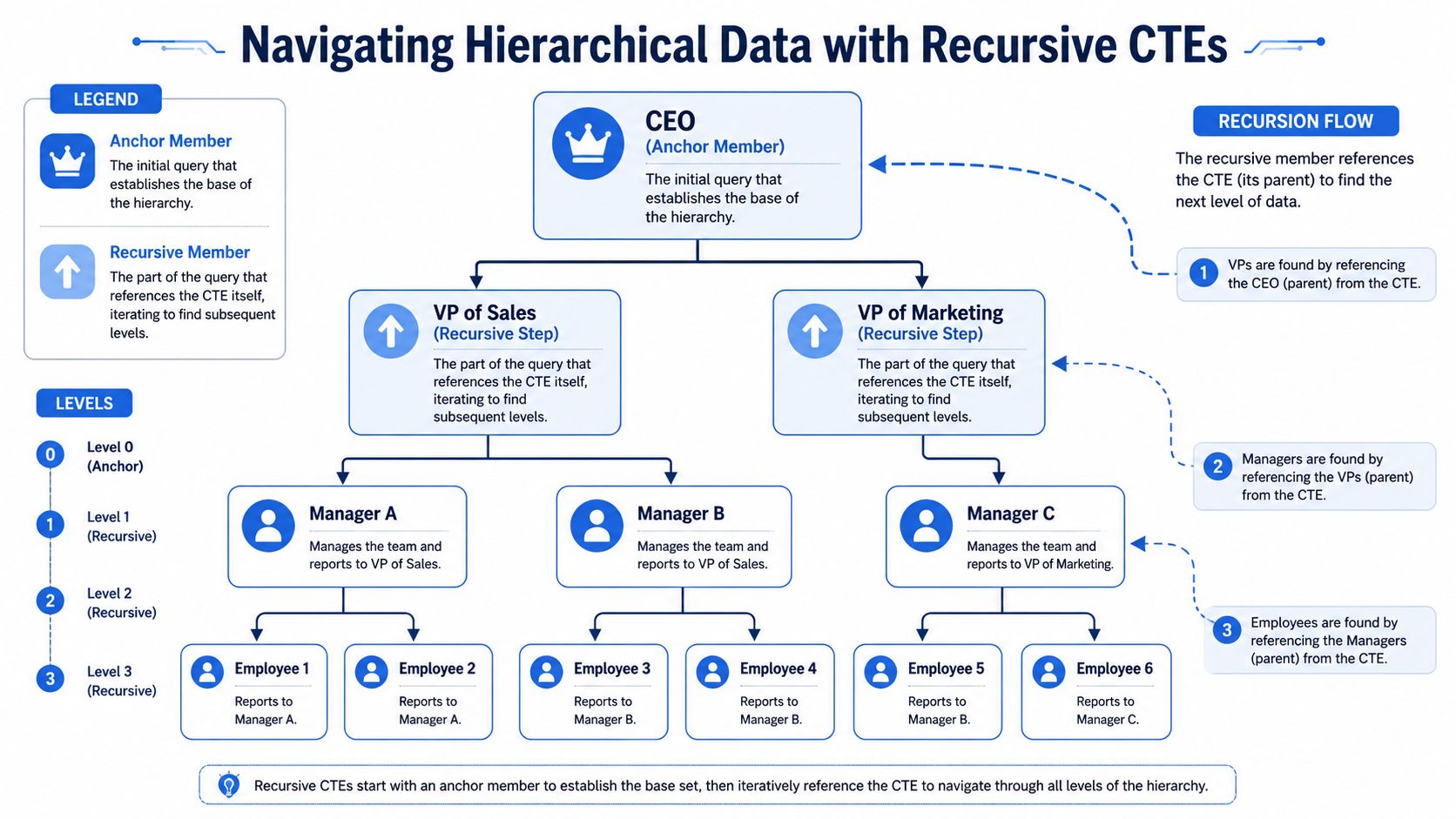
The standard recursive pattern has two parts: an initial non-recursive query called the anchor, followed by a recursive part combined with UNION or UNION ALL. The choice matters because UNION removes duplicates, which can change traversal behavior and affect correctness and performance, while UNION ALL is generally preferred when walking hierarchies because it doesn't check for duplicates, as described in Cockroach Labs documentation on common table expressions.
In plain language:
Anchor member: where the recursion starts
Recursive member: how the query finds the next level
Termination condition: why it eventually stops
Most recursive SQL becomes easier once you picture it as “start here, then keep finding the next parent or child.”
An org chart example
Say you have an employees table with employee_id, employee_name, and manager_id. You want the management chain for one employee up to the CEO.
Read it step by step.
The anchor grabs employee 101. The recursive part then finds that employee's manager by joining the current row back to employees. Each pass moves one level higher. The query stops when it reaches someone whose manager_id no longer matches another employee, usually the CEO.
Where analysts get tripped up
Most confusion comes from three places:
Direction of the join: Are you walking up the tree to a manager, or down the tree to direct reports?
Wrong set operator:
UNIONcan lead to unexpected behavior changes if duplicate removal matters.Missing stop logic: Bad hierarchy data can create loops.
Here's the mental model that helps. The recursive CTE doesn't “loop” in the way application code does. It repeatedly applies the recursive member to the rows produced in the prior step. Each iteration extends the result.
Recursive CTEs are best when the number of levels isn't fixed ahead of time.
That makes them powerful in analytics. If a company reorganizes and adds management layers, your query still works. If a product taxonomy gets deeper, you don't need to rewrite a chain of self-joins.
CTEs in the Modern Data Stack Performance and Best Practices
A lot of CTE advice floating around the internet was written for older database habits. Modern cloud warehouses change the conversation.
How to think about performance in cloud warehouses
In systems like Snowflake and BigQuery, the first reason to use common table expressions is usually readability. Query planners often rewrite or optimize the statement under the hood, so the old blanket rule that “CTEs are always slower” isn't a useful default. You still need to inspect query plans and test important workloads, but the right first question is usually, “Does this structure make the logic correct and maintainable?”
There's also real evidence that CTE-based SQL can handle demanding analytical use cases. A 2015 paper described a Boolean query generator built with CTEs for the i2b2 clinical-research query tool and showed it could scale to large datasets in a production-style healthcare analytics setting, as reported in the PubMed Central paper on CTE-based query generation.
That should reset the discussion a bit. CTEs aren't just teaching syntax. They're a practical abstraction for complex analytics.
Best practices that hold up in real teams
Here are the habits I'd push on any analytics team:
Name for business meaning:
paid_accountsbeatscte1. The name should tell reviewers what rows belong there.Select fewer columns early: Don't carry around fields you won't use. Wide intermediate datasets make debugging harder and can increase scan work.
Chain logic in a natural order: Clean data first, join next, aggregate last.
Split concepts, not just code: A CTE should represent one meaningful transformation, not an arbitrary chunk of lines.
Materialize when reuse is a core need: If the same heavy intermediate dataset feeds several downstream steps, a temp table or modeled table may be the better fit.
Test assumptions in each layer: Run each CTE on its own during development by selecting from that step.
For teams using AI-assisted analytics tools, structure matters too. Tools that generate SQL from natural language tend to produce more reviewable output when the logic is broken into named stages. In warehouse-connected platforms such as Snowflake, BigQuery, and Querio's query optimization workflow, that readability makes human review faster.
Clean structure won't rescue a bad data model, but it will make model problems visible much sooner.
Why CTEs Are a Superpower for Your Data Team
Common table expressions help individual analysts write cleaner SQL. They also help teams reason about data the same way.
A well-structured CTE query is easier to review, easier to debug, and easier to hand off. New analysts can read the steps and understand the business logic without reverse-engineering nested parentheses. Product managers and data leads can inspect assumptions faster because the transformations are named in plain language.
That's why CTE skill scales beyond syntax. It improves collaboration. It reduces accidental logic drift. It makes self-serve analytics safer because the SQL itself becomes documentation.
If your team works in a modern warehouse, this is one of the most impactful habits to build. Not because it looks elegant, but because it lets people move quickly without making the data harder to trust.
If your team wants analysts and non-technical users to explore warehouse data without turning the data team into a ticket queue, Querio is one option to evaluate. It connects directly to your warehouse and uses AI-driven query generation plus notebook-style workflows so teams can ask questions, inspect SQL, and build on shared logic with more structure.

