Data Warehouse Best Practices 2026: Scale & Optimize
Master data warehouse best practices for 2026. Learn to scale analytics, control costs, and empower teams with expert tips on architecture & security.
https://www.youtube.com/watch?v=Zw30wjxSlD4
published
Outrank AI
data warehouse best practices, data warehousing, analytics engineering, data architecture, self-service analytics
d296d954-b2e8-44d5-add7-d845ade0b9d7
Your data team is overwhelmed. Requests keep stacking up in Slack, product managers are waiting on funnel cuts that should take minutes, and leadership keeps asking why a company with so much data still moves so slowly. This isn't a team failure. It's a system failure.
Most mid-market teams don't need more dashboards first. They need a warehouse that people can use without filing a ticket for every question. That's the difference between a reporting repository and a decision engine. A modern warehouse should make common analysis easier, definitions clearer, and change safer. If it doesn't, your analysts become a human API.
The gap usually isn't tooling alone. It's architecture, modeling, governance, performance discipline, and documentation. Teams often wire up ingestion, land a lot of raw data, and assume self-service will follow. It usually doesn't. Non-analysts don't need more tables. They need trusted pathways through the data.
Cloud adoption reinforces that shift. The global cloud data warehouse market was estimated at USD 7.2 billion in 2023 and is projected to reach USD 56.6 billion by 2033, with a 22.9% CAGR, according to cloud data warehouse market projections from Market.us. For practitioners, the implication is simple. Design for elastic compute, separated storage and compute, and workload isolation from the start.
These are the data warehouse best practices that matter most when you're trying to scale self-service analytics without burning out the data team.
Table of Contents
3. Design for Scalable Query Performance and Cost Optimization
5. Adopt Incremental and Modular Data Transformation Patterns
6. Design for Self-Service Analytics with Clear Data Documentation
7. Implement Real-Time or Near Real-Time Data Pipelines for Operational Analytics
9. Use Version Control and CI CD for Data Transformation Code
1. Implement a Centralized Data Model Architecture
If every dashboard defines revenue, active users, or conversion differently, self-service dies early. People stop trusting the warehouse and go back to asking analysts for “the right number.” A centralized data model fixes that by putting business logic in one place instead of scattering it across BI tools, ad hoc SQL, and team spreadsheets.
The strongest pattern is still to model around business processes, not source systems. A foundational best practice is to start with measurable events such as orders, claims, or shipments and organize facts around those processes, which improves usability because analysts can query in terms the business already understands, as described in Streamkap's guide to data warehousing best practices.
Model business processes first
Dimensional modeling remains practical because it matches how teams think. Product managers ask about signups, activations, subscriptions, cancellations, and feature usage. They don't ask for tables named after operational services or JSON payload history.
A good centralized model usually has a few characteristics:
Clear fact tables: Event-heavy processes like orders, sessions, subscriptions, and support interactions belong in fact tables.
Stable shared dimensions: Customer, account, plan, product, geography, and time dimensions should be reused, not recreated by each team.
Explicit business grain: Every table should make clear what one row represents.
If you're comparing approaches, this overview of data warehouse architectures is useful for choosing a structure that won't collapse under broader usage.
Practical rule: If a product manager can't explain what a row means in plain English, the model isn't ready for self-service.
Airbnb, Stripe, and DoorDash are often cited as examples of teams pushing semantic consistency and reusable business logic. The lesson isn't to copy their stack. It's to stop publishing raw warehouse complexity as if it were a product.
2. Establish Data Governance and Lineage Tracking
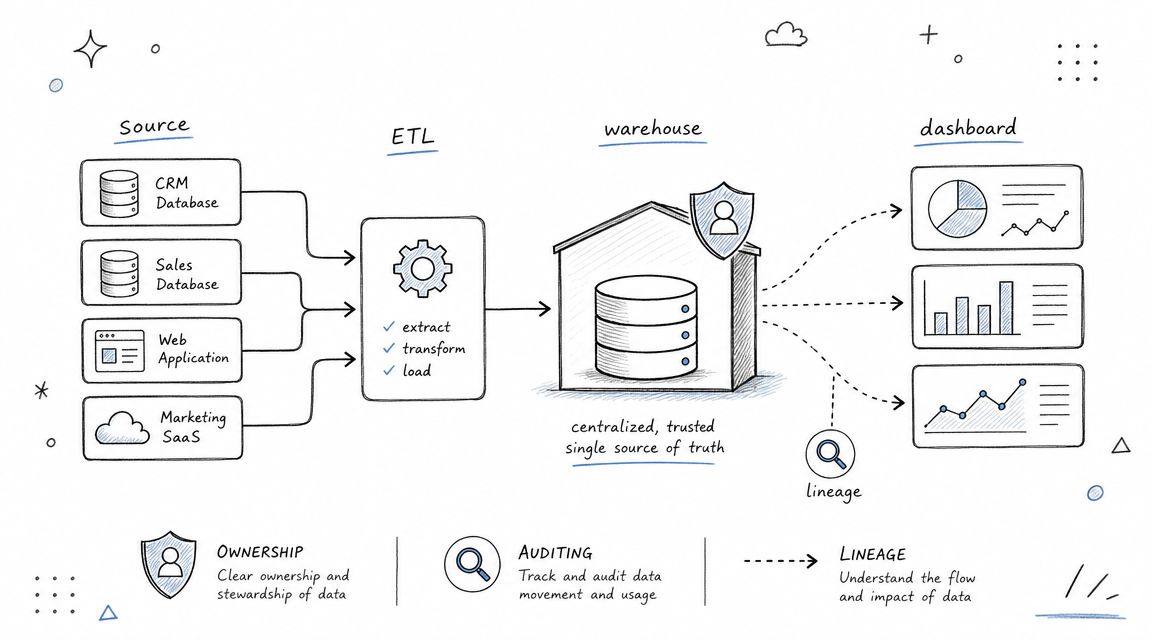
Governance gets dismissed as bureaucracy until the first serious trust failure. A dashboard breaks, a metric changes unannounced, or a sensitive field lands in the wrong model. Then everyone suddenly wants ownership, approval paths, and documentation.
For mid-market teams, governance doesn't need a giant committee. It needs visible responsibility. Every critical domain should have an owner, every important metric should have a definition, and every published table should have lineage that shows where the data came from and how it changed.
Make ownership visible
Lineage matters because self-service users aren't close to pipeline logic. If a PM sees that an “activated_user” metric comes from product events, then a dbt model, then a semantic definition, they can assess whether it fits their use case. If they can't, they'll either misuse it or ask the data team again.
Good governance usually starts small:
Assign domain owners: Someone should own billing, product usage, lifecycle, finance, and support models.
Document critical transformations: Focus first on the tables and metrics executives and product teams use every week.
Expose freshness and lineage: Users should see where data originated and when it last updated.
A practical reference for building that discipline is this guide to data governance best practices.
Current best-practice guidance also points toward richer metadata, schema-drift handling, idempotent workflows, and machine-readable definitions so humans and AI systems can safely query warehouse data without turning the data team into a bottleneck, as discussed in Fivetran's best practices in data warehousing.
Here's a useful explainer to share internally when teams need a common frame for lineage and monitoring:
3. Design for Scalable Query Performance and Cost Optimization
Nothing undermines warehouse adoption faster than slow queries and surprise bills. The pattern is familiar. Leadership wants broader access, more teams start querying directly, and the warehouse that felt fast with a few analysts now drags under mixed workloads.
Performance work isn't glamorous, but it's one of the most important data warehouse best practices because self-service multiplies both good and bad query behavior. A sloppy model plus unrestricted usage turns cloud elasticity into expensive chaos.
Optimize the workloads people actually run
Industry guidance for mid-market and enterprise implementations consistently recommends CDC or delta loads, built-in validation at ingestion, and the use of hot and cold storage tiering, compression, and partitioning or materialized views to preserve query performance and control costs at scale, according to Integrate.io's warehouse best-practices guide.
That advice holds up in practice because most warehouse pain comes from a few repeat issues:
Scanning too much data: Large fact tables need partitioning by the access pattern people use, often time.
Joining on messy keys: Clustering and clean join paths matter more than warehouse-specific tuning tricks.
Serving mixed workloads together: Dashboard refreshes, exploratory notebooks, and heavy backfills shouldn't fight for the same resources.
When teams want faster ad hoc analysis, I usually start with the ugliest recurring queries, not warehouse settings. Review execution plans, simplify joins, and teach people how to avoid accidental full scans. This guide to optimizing a query is a good operational companion for that work.
Slow queries aren't only a technical issue. They train the business not to ask questions.
Real examples from companies like Notion, Figma, and Segment are useful because they show the same pattern: cost and speed problems usually trace back to workload design, table design, and refresh design, not just the database engine.
4. Implement a Metrics Layer or Semantic Layer
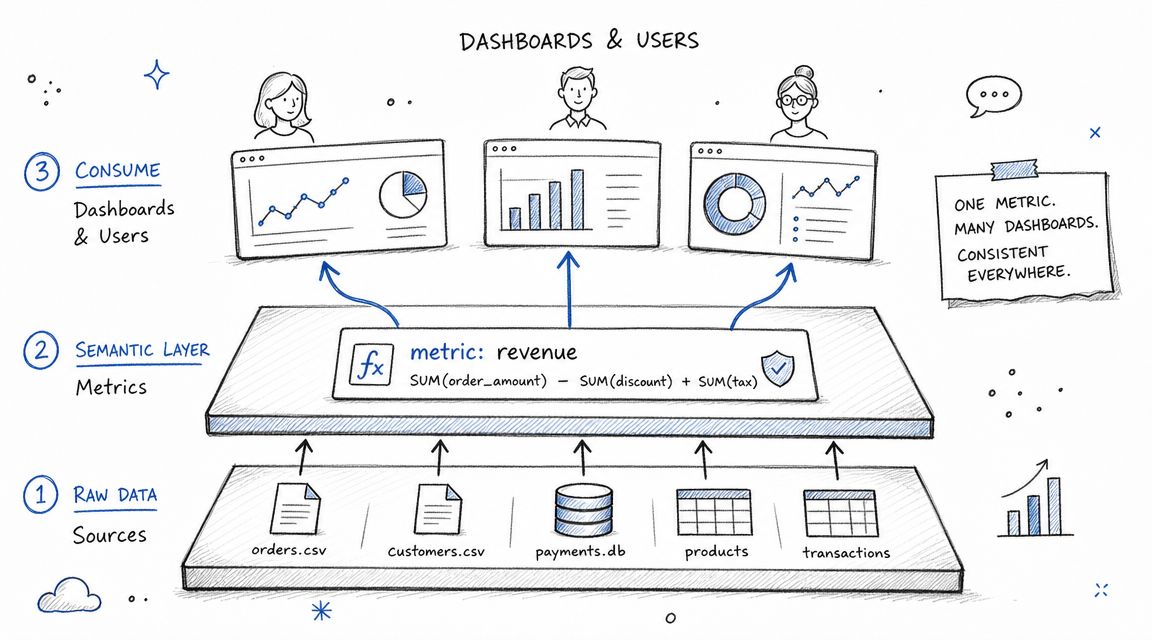
A warehouse can be technically sound and still fail the business if every tool defines core metrics differently. That's why a metrics layer or semantic layer matters. It sits between your modeled data and the people or systems consuming it, so shared business definitions don't get reimplemented everywhere.
Self-service becomes realistic for product and business users. Rather than asking them to understand warehouse joins, event deduplication, or edge-case filters, you give them reusable metrics and dimensions with consistent logic.
Define metrics once
The most practical way to start is narrow. Pick the handful of metrics that drive company decisions. For a product team, that might be signups, activated accounts, retained users, expansion revenue, churned subscriptions, and feature adoption. Define them once, document the assumptions, and expose them consistently across dashboards, notebooks, and AI-assisted workflows.
That discipline reduces analyst overhead because fewer people are rebuilding the same KPI logic from scratch. It also surfaces disagreements earlier. When finance and product don't define “active customer” the same way, the semantic layer forces that conversation into the open.
If your team is still sorting out terminology, this breakdown of metrics layer vs semantic layer differences helps frame the decision.
A semantic layer doesn't remove complexity. It moves complexity to the place where it can be reviewed, versioned, and trusted.
Airbnb, DoorDash, and Lyft have all been associated with centralized metric definition patterns. The key lesson is portability of logic. Definitions should survive changes in BI tools and survive growth in the number of people asking questions.
5. Adopt Incremental and Modular Data Transformation Patterns
Full refreshes feel simple until they don't. They work fine on small datasets and gradually become a liability as event volume, source count, and refresh expectations increase. Eventually, a “simple nightly rebuild” starts colliding with business hours, burning compute, and delaying downstream reports.
Incremental transformation is the practical answer. Instead of reprocessing everything, process only new or changed data. Streamkap notes that delta-based processing can significantly reduce processing time, network traffic, and resource consumption, and Fivetran also recommends incremental syncs when only recent changes matter, as described earlier in the article.
Build transformations that can change safely
Modular design matters just as much as incrementality. Break your pipeline into reusable stages with clear contracts: raw ingestion, cleaned staging, business-conformed models, and published marts or semantic definitions. When a schema changes upstream, you want one bounded place to fix it, not twenty dashboards to patch.
The best modular pipelines usually share a few traits:
Idempotent jobs: Re-running a task shouldn't corrupt the result.
Explicit dependencies: Teams should know what breaks if a source changes.
Scoped transformations: Keep source cleanup separate from business logic and separate from presentation models.
This matters even more in cloud environments where large, continuously updated datasets are normal, not exceptional. Incremental design isn't an optimization you add later. It's part of building for scale.
Teams using dbt, Fivetran, and custom SQL frameworks all run into the same trade-off. More modularity means more objects to manage. That's worth it. Debugging a short chain of named models beats reverse-engineering one giant transformation every time.
6. Design for Self-Service Analytics with Clear Data Documentation
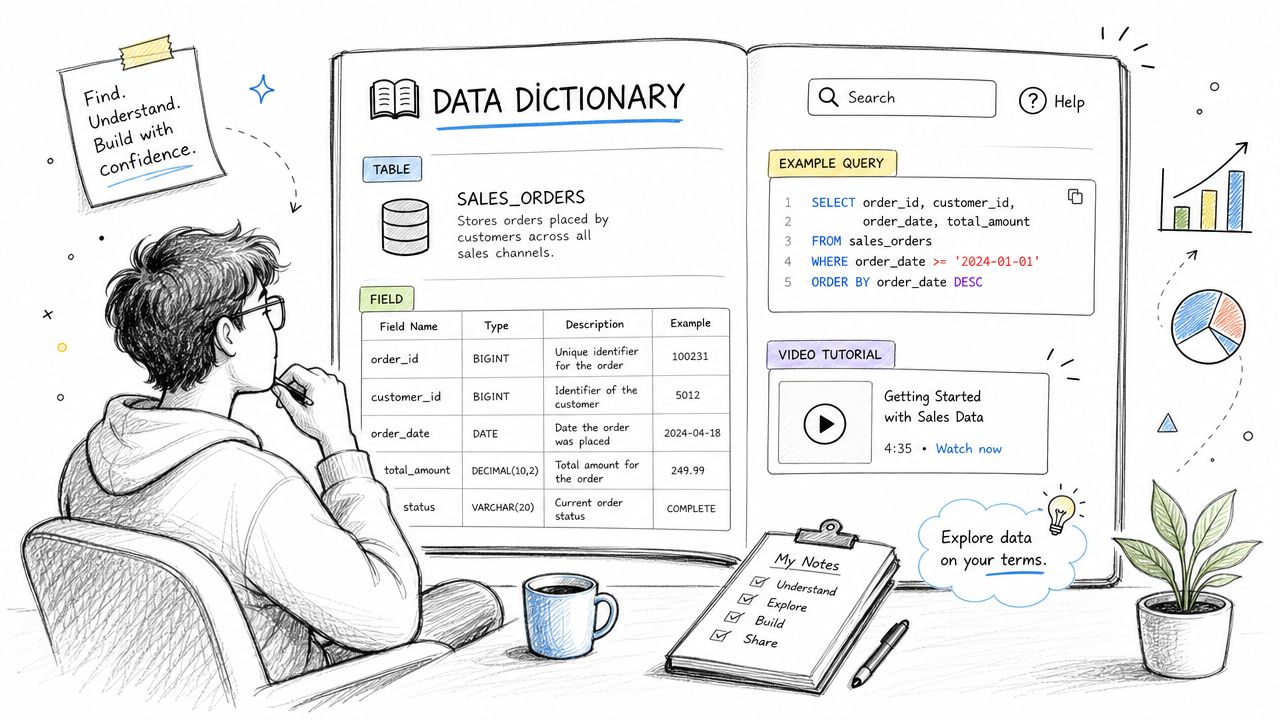
Most self-service programs fail for a boring reason. People can't tell which table to use, what a field means, or whether a metric is safe for decision-making. When that happens, they either stop using the warehouse or use it badly.
Documentation isn't separate from the warehouse experience. For non-analysts, it is the experience. The model may be elegant, but if a product manager can't understand the names, grains, filters, and caveats, they'll still need an analyst to translate.
Documentation is part of the product
The best warehouse documentation answers practical questions fast. What does this table represent? How fresh is it? Who owns it? What are the common joins? Which fields are deprecated? What are the known caveats?
Good documentation tends to be opinionated:
Use business language: “subscription_started_at” beats internal service jargon.
Show examples: A sample query teaches faster than a long definition.
Call out caveats: If a field excludes backfilled events or lags a source system, say so.
Stripe, GitLab, and Notion are useful examples because they treat internal data docs like product surfaces, not afterthoughts. A searchable catalog plus lightweight examples often does more for self-service than another dashboard layer.
Plain naming conventions also matter more than teams admit. Consistent schemas, stable prefixes, and obvious time fields reduce the number of questions that ever reach the data team.
7. Implement Real-Time or Near Real-Time Data Pipelines for Operational Analytics
Not every question needs real-time data. A board deck doesn't care about second-level freshness. A product launch war room often does. The mistake is forcing the whole warehouse into one latency standard.
Operational analytics deserves its own freshness design. If support leaders are triaging queue spikes, growth teams are watching conversion drops during an experiment, or marketplace teams are balancing supply and demand, waiting for the next batch run creates avoidable lag.
Use freshness where latency changes behavior
The most effective teams start with batch and earn their way into streaming. Real-time pipelines add complexity fast. You have to handle duplicates, out-of-order events, retries, replay, and backpressure. That's why “real-time everything” is usually wasteful for mid-market teams.
Use near real-time or streaming where decisions change in the moment:
Live product monitoring: Funnel breaks, feature rollout checks, signup failures.
Operations workflows: Delivery status, fraud review, incident response, support escalation.
Customer-facing analytics: Views where stale data creates a visibly worse product.
Uber, Shopify, and DoorDash are common examples because their operations depend on current-state visibility. Most mid-market SaaS companies don't need that level everywhere, but many need it somewhere.
A good rule is simple. If fresher data won't change an action, don't pay streaming complexity for it. If it will, define the SLA clearly and engineer that path intentionally.
8. Establish Data Quality Monitoring and Automated Alerting
A warehouse becomes dangerous when bad data looks normal. That's what quality monitoring prevents. Self-service means more people are consuming data farther from the pipeline, so problems have to be caught before users discover them in a meeting.
The hard part isn't deciding that quality matters. It's deciding what to monitor first. Trying to test everything from day one usually creates alert noise and no accountability.
Trust breaks faster than it forms
Start with the tables and metrics people use to make decisions. Check freshness, row-count continuity, null spikes in critical fields, accepted value ranges, uniqueness where keys should be unique, and schema drift at the ingestion layer. Then attach each alert to an owner who can respond.
Monitor the business meaning, not just the pipeline status.
A pipeline can succeed technically while still publishing nonsense. That's why metric-level checks matter alongside ingestion and transformation checks. If signups suddenly drop because a client-side event stopped firing, warehouse jobs may still be green.
Teams using Great Expectations, Soda, Databand, and custom test frameworks all run the same playbook: shift checks earlier, expose failures clearly, and quarantine broken outputs when necessary. If you're evaluating adjacent automation approaches, this piece on secure data processing for your business adds a useful operational perspective.
Known caveats should also be visible to users. Hiding issues to preserve confidence usually backfires. Flagged uncertainty is better than silent inaccuracy.
9. Use Version Control and CI CD for Data Transformation Code
Data teams still break production by editing SQL as if it were a shared note. That approach doesn't survive scale. Once multiple people touch models, metrics, tests, and pipelines, warehouse logic needs the same engineering discipline as application code.
Version control changes team behavior as much as it changes process. Pull requests force reviewers to inspect business logic, not just syntax. Commit history gives context when a metric changes. Branching lets people test changes without destabilizing production.
Treat warehouse logic like production software
A solid workflow usually includes Git, code review, automated tests, and environment separation across development, staging, and production. dbt fits naturally here, but the principle applies equally to SQL scripts, Python jobs, and orchestration code in tools like GitHub Actions or GitLab CI.
What works in practice:
Require tests for critical models: Especially keys, relationships, freshness, and accepted values.
Protect production branches: Warehouse logic shouldn't merge without review.
Review semantic changes explicitly: A small SQL edit can redefine a KPI.
I've seen teams improve trust by making metric changes legible. When users can see who changed a transformation, why it changed, and what tests passed, confidence goes up even before the underlying model gets better.
Stripe, GitLab, and dbt are useful reference points here because they normalized the idea that analytics code is software, not analyst scratch work.
10. Implement Role-Based Access Control and Data Security
Self-service dies in one of two ways. Either access is so restricted that nobody can do useful work, or access is so broad that security teams shut the whole thing down. Good role-based access control avoids both outcomes.
The point isn't to lock down everything. It's to widen access safely. Product managers should be able to answer product questions without seeing sensitive customer attributes they don't need. Finance should access billing logic without inheriting broad permissions to unrelated operational datasets.
Access should expand safely
Start with role-based access at the table or schema level, then add finer control where sensitivity requires it. Row-level security matters for multi-tenant or regional data. Dynamic masking helps when users need analytical value without seeing raw PII. SSO integration keeps identity management centralized instead of scattering it across warehouse roles and BI tools.
The most practical security habits are often the least glamorous:
Classify data clearly: Public, internal, confidential, restricted.
Log access: Auditing matters when access expands.
Review permissions regularly: Privilege creep is normal unless someone cleans it up.
Here, governance, documentation, and semantic design converge. A warehouse is easier to secure when published data products are intentional and well described. It's much harder when teams query sprawling raw layers directly.
Stripe, GitHub, and Datadog are often referenced because they show that broad analytical access and strong controls can coexist. That's the standard to aim for. Not maximum openness or maximum restriction, but safe usability.
Top 10 Data Warehouse Best Practices Comparison
Practice | Implementation complexity | Resource requirements | Expected outcomes | Ideal use cases | Key advantages |
|---|---|---|---|---|---|
Implement a Centralized Data Model Architecture | High upfront design and coordination | Data modeling expertise, dbt-like tooling, governance time | Single source of truth, consistent metrics, simplified queries | Organizations needing standardized analytics across teams | Standardization, reduced redundancy, improved query performance |
Establish Data Governance and Lineage Tracking | High, policy, process and cultural change | Metadata/catalog tools, governance council, documentation effort | Trusted data, traceability, faster root-cause investigation | Regulated industries and large analytics organizations | Accountability, compliance support, clear lineage |
Design for Scalable Query Performance and Cost Optimization | Medium–high, warehouse-specific tuning | Performance engineers, monitoring tools, cloud cost management | Lower latency, controlled cloud spend, scalable concurrency | High-query volumes, large datasets, growing self-service usage | Faster queries, cost savings, better scalability |
Implement a Metrics Layer or Semantic Layer | Medium, define and integrate metrics centrally | Business stakeholders, metric tooling (LookML/dbt Metrics), governance | Consistent KPIs, easier non-technical analysis, reusable metrics | Teams needing shared KPI definitions across tools and reports | Single metric definitions, simplified analysis, cross-tool consistency |
Adopt Incremental and Modular Data Transformation Patterns | Medium, state management and modularization | dbt/CDC tools, engineering effort, tests | Faster pipeline runs, lower costs, easier debugging and reuse | Large fact tables, frequent updates, agile data teams | Reduced processing time/cost, modular reuse, parallel development |
Design for Self-Service Analytics with Clear Data Documentation | Low–medium, initial effort, ongoing upkeep | Writers, data catalog, sample queries and tutorials | Higher adoption, fewer support requests, faster onboarding | Organizations scaling non-technical users and analysts | Empowered users, reduced analyst burden, clearer definitions |
Implement Real-Time or Near Real-Time Data Pipelines for Operational Analytics | Very high, streaming architecture complexity | Streaming platforms (Kafka/Kinesis), CDC, streaming engineers | Low-latency insights, operational dashboards, rapid responses | Real-time monitoring, fraud detection, live product metrics | Timely decisions, faster anomaly detection, operational agility |
Establish Data Quality Monitoring and Automated Alerting | Medium, rule definition and tuning | Quality tools (Great Expectations/Soda), owners, alerts | Early detection of issues, higher trust in analytics, fewer incidents | Critical reporting, regulated workflows, large pipeline estates | Prevents bad data, faster remediation, measurable SLAs |
Use Version Control and CI/CD for Data Transformation Code | Medium, process adoption and CI setup | Git, CI tools, automated tests, review workflows | Safer deployments, auditable changes, faster iteration | Teams with frequent model changes and multiple developers | Reduced breakages, rollback capability, improved collaboration |
Implement Role-Based Access Control and Data Security | High, policy and fine-grained controls | Identity providers (SSO), security tooling, audits | Protected sensitive data, compliance, controlled self-service | Organizations handling PII, finance, multi-tenant data | Compliance support, minimized exposure, audit trails |
Scale Your Team by Scaling Your Infrastructure
The biggest shift in a healthy warehouse program isn't technical. It's organizational. The data team stops acting like a report desk and starts acting like a platform team. That means fewer one-off requests, fewer definitions trapped in analyst heads, and fewer delays between a business question and a decision.
That's why data warehouse best practices matter beyond architecture diagrams. Centralized modeling creates shared language. Governance and lineage create trust. Performance and cost discipline keep adoption sustainable. Incremental pipelines make freshness practical. Documentation gives non-analysts a path into the system. Security keeps broader access from turning into risk.
For mid-market product and data teams, the actual trade-off isn't whether to invest in self-service. It's whether to invest early in the foundations that make self-service safe. If you skip those foundations, demand still arrives. It just arrives as dashboard requests, urgent Slack messages, metric disputes, and broken trust. That's how teams become the human API.
The newer challenge is making the warehouse trustworthy enough for both people and AI-assisted workflows. More automation helps, but it doesn't solve semantic inconsistency, weak lineage, or undocumented caveats. If your definitions aren't machine-readable, your permissions aren't clear, and your validations aren't continuous, AI can spread bad logic faster than a manual workflow ever could. That makes the warehouse design discipline even more important, not less.
This is also why platform choices should support your operating model, not fight it. If your team wants to scale self-service, tools that sit directly on the warehouse, respect existing permissions, and reuse semantic logic will fit better than tools that create parallel definitions and duplicate business rules. Querio is one option in that category. It connects to warehouses in read-only fashion and supports semantic definitions and role-based access, which fits the kind of governed self-service setup described here.
Even adjacent roles reflect the same underlying lesson. Companies don't scale by relying on heroic individuals forever. They scale by building systems with clear ownership, safe defaults, and repeatable controls. That same pattern shows up in infrastructure teams, application teams, and even in paths like an expert security professional career, where sustainable operations depend on process and architecture, not constant manual intervention.
If you get this right, the warehouse stops being a place where data goes to wait. It becomes the place where decisions start moving.
If your team is buried in analytics requests, Querio is built around the idea that the warehouse should power self-service, not more ticket queues. It gives teams a way to query and build on warehouse data with AI-assisted workflows while keeping logic, permissions, and access anchored to the warehouse itself.

